









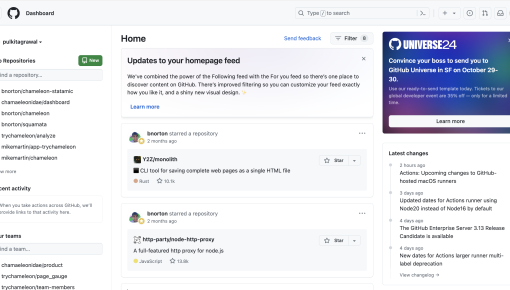
GitHub's Event Promotion Card
An embeddable Card in the GitHub dashboard that promotes an upcoming event and announces a special offer...



Existing customer? Sign in
Sign up for an event directly inside the product by entering your email address, making it quick and easy to register without leaving your current workflow.
You've crafted the perfect webinar, lined up expert speakers, and sent multiple email campaigns—yet your event registration numbers remain disappointingly low. Sound familiar? You're not alone. Most product teams rely heavily on email marketing to promote events, but there's a more effective approach hiding in plain sight: in-app event registration forms.
An in-app event registration form is a contextual signup experience embedded directly within your product interface, allowing users to register for events without leaving their current workflow. Unlike traditional email campaigns or external landing pages, these forms capture users when they're already engaged and active in your product, leading to significantly higher conversion rates and better user experience.
Product teams are increasingly moving beyond email-only promotion because they've discovered a simple truth: timing and context matter more than frequency. When you present event registration opportunities at the right moment in the user journey, you're not interrupting—you're adding value. With Chameleon's Microsurvey feature, you can create these seamless registration experiences without requiring developer resources or disrupting your product roadmap.
An in-app event registration form is a registration interface embedded within your product experience that allows users to sign up for events, webinars, training sessions, or other company-hosted activities without leaving the application. Unlike external landing pages or email campaigns that redirect users away from their current task, these forms appear contextually within the product interface.
The key advantage lies in context and timing. When users encounter an event registration form while actively using your product, they're already in an engaged mindset. They understand your product's value, they're familiar with your interface, and they're more likely to see the event as relevant to their current goals. This contextual advantage typically results in 3-5x higher conversion rates compared to traditional email-based registration campaigns.
In-app event registration works particularly well for webinars, product demos, training sessions, user conferences, feature launch events, and customer success workshops. These forms connect directly to your product adoption and user engagement strategies by promoting events that help users get more value from your product, ultimately driving deeper engagement and reducing churn.
The registration process becomes part of the product experience itself, rather than a separate marketing touchpoint. This integration helps maintain user flow while providing valuable opportunities for education and community building.
Creating effective in-app event registration forms requires strategic planning and thoughtful execution. Here's a step-by-step approach to implementation:
Step 1: Identify Optimal Placement Within User Workflows Analyze your user journey to find natural moments where event promotion adds value rather than interruption. Look for completion states (after finishing a task), exploration phases (browsing new features), or moments of potential friction where additional guidance would be helpful.
Step 2: Design the Form Interface Keep your form design simple and focused. Use a clear heading like "Sign up for free: [Event name]" followed by a brief value proposition and a single email field. Avoid asking for excessive information that creates friction. The goal is to capture interest quickly and follow up with details later.
Step 3: Set Up Targeting and Timing Rules Define which users should see the registration form based on their behavior, role, product usage patterns, or lifecycle stage. Consider factors like feature adoption, time since signup, or specific actions that indicate readiness for advanced training.
Step 4: Configure Data Collection and Integration Ensure your registration data flows seamlessly into your existing tech stack, including your CRM, marketing automation platform, and event management tools. This integration enables proper follow-up and attendance tracking.
Step 5: Optimize for Conversion Monitor conversion rates, but also track downstream metrics like actual event attendance and post-event engagement.
Chameleon's Microsurvey feature makes this process straightforward for product teams. You can build registration forms without developer resources, leverage advanced targeting capabilities to reach relevant user segments, and integrate seamlessly with your existing tech stack for smooth data flow. The platform's no-code approach means you can iterate quickly based on performance data.
Timing Matters More Than Frequency Show registration forms at moments when users are most receptive—after completing a significant task, when exploring new features, or during natural pause points in their workflow. Avoid interrupting focused work sessions or critical user flows.
Target Strategically, Not Broadly Segment users based on behavior, role, or product usage patterns rather than showing the same event to everyone. A power user might be interested in advanced training sessions, while new users need foundational webinars. Use behavioral triggers like feature adoption or time spent in specific areas to inform your targeting strategy.
Optimize Copy for Clarity and Value Your event name should immediately communicate the benefit. Instead of "Q4 Product Update," try "New Features That Will Save You 2 Hours Per Week." Headlines should answer the user's implicit question: "What's in it for me?"
Minimize Form Friction Collect only essential information upfront—typically just an email address. You can gather additional details through follow-up emails or during the event itself. Every additional field reduces conversion rates significantly.
Design Thoughtful Follow-up Experiences After registration, provide clear confirmation messages and next steps. Tell users what to expect, when they'll receive event details, and how to prepare. This reduces no-show rates and increases engagement.
Measure What Matters Track conversion rates, but don't stop there. Monitor actual event attendance, post-event engagement, and long-term product adoption metrics. The goal isn't just registrations—it's meaningful participation that drives product success.
Chameleon's advanced targeting capabilities allow you to implement these best practices without developer resources. The platform's integrations with product analytics provides deeper insights into user behavior and event impact.
In-app event registration forms work particularly well for several scenarios. New feature launch events benefit from targeting existing users who haven't yet adopted the feature, creating awareness and driving adoption simultaneously. Onboarding webinars can be promoted to trial users who show signs of engagement but haven't fully activated, providing the guidance they need to succeed.
Advanced training sessions work well for power users who've mastered basic functionality and are ready for more sophisticated use cases. Customer success workshops can target users showing signs of potential churn, offering proactive support and community connection. Product roadmap presentations appeal to engaged users who want to influence future development and stay ahead of new capabilities.
How do I customize the event registration form template? Many platforms, including Chameleon, offer no-code customization options. You can modify headlines, descriptions, form fields, and styling to match your brand and event requirements without coding knowledge.
What information should I collect in an in-app event form? Start with just an email address to minimize friction. You can collect additional details like role, company size, or specific interests through follow-up emails or during event check-in.
How do I measure the success of in-app event registration? Track conversion rates from form views to registrations, but also monitor downstream metrics like actual attendance rates, post-event engagement, and changes in product adoption behavior.
Can I integrate event registration data with my CRM? Yes, most modern platforms offer integrations with popular CRM and marketing automation tools. This ensures registered users receive appropriate follow-up communications and sales teams have visibility into engagement levels.
What's the best timing for showing event registration forms? Target moments of natural engagement rather than interruption—after task completion, during feature exploration, or when users demonstrate specific behaviors that indicate readiness for additional learning.
In-app event registration forms represent a powerful opportunity to drive event attendance while enhancing the overall product experience. By meeting users where they already are—engaged and active in your product—you can achieve higher conversion rates and create more meaningful connections between your events and user success.
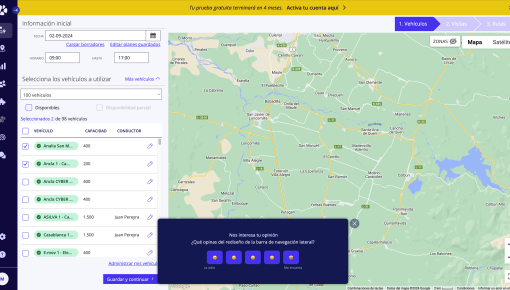
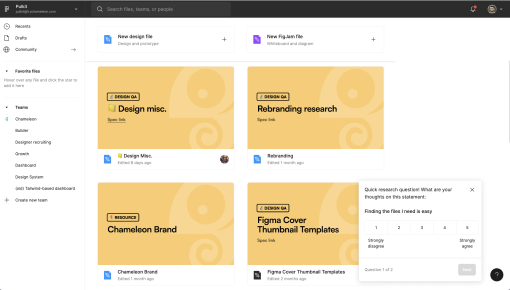
Start a free trial or talk to our team.
