









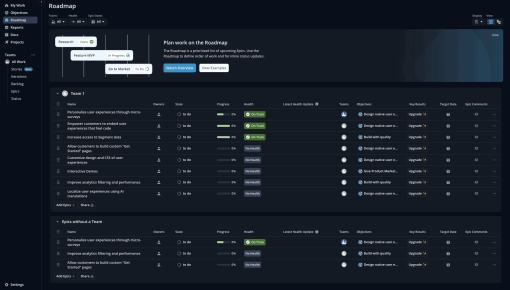
Shortcut's Embedddable Card
Shortcut uses an Embeddable Card to nudge new users to discover their "Roadmaps" feature. The team uses a...



Existing customer? Sign in
Promote upcoming events directly inside your product to encourage users to register by showing a clear, attention-grabbing message and a prominent "Register now" button. Drive more event signups by reaching users while they are actively engaged with your product.
When your team is planning the next big conference, webinar, or product launch event, where do you promote it? Most product teams default to email campaigns, social media posts, and external ads. But there's a more effective channel hiding in plain sight: your own product.
Event promotion banners are contextual, in-product notifications that appear directly within your SaaS interface. Unlike external marketing channels that compete for attention in crowded inboxes, these banners reach users when they're already engaged and actively using your product. The result? Higher engagement rates, better-qualified event attendees, and registration conversions that often outperform traditional email campaigns by 3-5x.
This event promotion banner template features a clean, single-line format with compelling headline text and a clear call-to-action structure. Whether you're promoting annual user conferences, educational webinar series, or exclusive community events, this template helps product teams drive meaningful event registrations without disrupting the user experience.
An event promotion in-app banner is a contextual notification displayed within your product interface to promote upcoming events, conferences, webinars, or community gatherings. Unlike external marketing channels such as email, social media, or paid advertisements, these banners appear directly in your product where users are already focused and engaged.
The template includes three core components: attention-grabbing headline text that creates interest, descriptive copy that communicates value, and a prominent registration call-to-action that drives conversions. For example: "ProductCon is next month! Expand your knowledge with industry experts and connect with fellow product leaders. Register now to secure your spot."
What makes in-app event banners particularly powerful is their contextual advantage. When users see your event promotion while actively using your product, they're in the right mindset to understand how the event relates to their current challenges and goals. This context-rich environment leads to higher-quality registrations from users who are genuinely interested in learning more.
The timing flexibility of product event notifications also sets them apart. These banners can appear based on user behavior triggers, specific product usage patterns, or scheduled campaigns. Using Chameleon, you can display event promotions with sophisticated targeting capabilities, ensuring the right message reaches the right users at the optimal moment. The customization options allow you to match your product's visual style while maintaining the banner's effectiveness.
Setting up an effective event promotion banner requires strategic planning and thoughtful execution. Follow these five steps to create banners that drive meaningful registrations:
1. Choose your event and timing Determine your promotion window based on event type and urgency level. For major conferences, start promoting 3-4 weeks in advance. Webinars and smaller events can have shorter promotion cycles of 1-2 weeks. Consider your audience's decision-making timeline and registration patterns from previous events.
2. Customize the message Adapt the template text to your specific event while maintaining clarity and compelling value propositions. Focus on what attendees will gain rather than just event details. Instead of "Join our quarterly webinar," try "Learn advanced analytics techniques that top product teams use to drive 40% more user engagement."
3. Set targeting rules Define which users see the banner based on role, product usage level, past event attendance, or engagement patterns. Chameleon's targeting engine allows you to create sophisticated audience segments. For example, promote advanced workshops to power users while showing introductory sessions to newer customers.
4. Design the banner Match your product's visual style and branding while ensuring the banner stands out enough to capture attention. Use Chameleon's visual editor to customize colors, fonts, and positioning without requiring developer resources. Consider placement carefully: top-of-page banners work well for high-priority events, while sidebar placements are less intrusive for ongoing promotions.
5. Configure the CTA Link directly to your registration page and set up proper tracking to measure conversions. Ensure the registration process is streamlined and mobile-friendly. Configure analytics to track not just clicks, but actual registrations and eventual event attendance through integration with your registration platform.
Creating event promotion banners that actually drive registrations requires more than just good design. These six best practices will help you maximize conversion rates and event attendance:
Time your promotion strategically Start with subtle awareness-building messages 3-4 weeks before the event, then increase frequency and urgency as the date approaches. Use different messaging phases: early awareness ("Save the date"), value-focused promotion ("Here's what you'll learn"), and final urgency ("Last chance to register").
Segment your audience intelligently Target based on user role, product usage patterns, or past event attendance rather than broad demographics. Product managers might be interested in roadmap sessions, while customer success teams care more about retention strategies. Use Chameleon's advanced targeting to show relevant event tracks to different user segments.
Create urgency without being pushy Use phrases like "limited seats available" or "early bird pricing ends Friday" when genuinely applicable. Avoid false scarcity, but do communicate real constraints. Mention speaker quality, exclusive content, or networking opportunities that create natural FOMO.
Match the event to user context Promote relevant sessions based on product usage patterns and current user challenges. If someone frequently uses your analytics features, promote data-focused sessions. Users struggling with onboarding might be interested in implementation workshops.
Test different messaging approaches A/B test value-focused copy against urgency-driven messages to see what resonates with your audience. Test different CTA text, banner colors, and placement options. Some audiences respond better to educational framing ("Learn how to...") while others prefer outcome-focused messaging ("Increase your conversion rates by 25%").
Track beyond clicks Measure actual registrations, event attendance, and post-event engagement rather than just banner clicks. Set up conversion tracking through your registration platform and follow up with attendee surveys. This data helps optimize future event promotion campaigns and demonstrates ROI to stakeholders.
Event promotion banners work effectively across various scenarios, each requiring slightly different messaging and targeting approaches:
Annual user conferences and product launches benefit from extended promotion campaigns with multiple message phases. Start with save-the-date announcements, progress to speaker reveals and agenda highlights, then finish with urgency-driven final calls. Target your most engaged users first, then expand to broader audiences.
Webinar series and educational events work well with value-focused messaging that emphasizes learning outcomes. Promote these to users who have engaged with similar content or shown interest in specific product areas. Consider creating series-specific landing pages that showcase the full curriculum.
Community meetups and networking events should emphasize connection and peer learning opportunities. Target users in specific geographic regions or industry verticals. Highlight local speakers or relevant case studies to increase relevance.
Partner events and co-marketing opportunities require careful audience selection to ensure relevance. Promote joint webinars to users who might benefit from integrated solutions or complementary tools. Use messaging that clearly explains the partnership value.
Internal events like user advisory boards or beta programs need exclusive, invitation-style messaging. Target your most engaged power users or customers who fit specific criteria. Emphasize the exclusive nature and their valuable input in shaping product direction.
Q: How far in advance should I start promoting an event? Start promoting major conferences 3-4 weeks in advance, webinars 1-2 weeks ahead, and community events 2-3 weeks prior. Adjust timing based on your audience's typical decision-making patterns and registration behavior from previous events.
Q: Can I customize the banner design to match my brand? Yes, Chameleon's visual editor allows complete customization of colors, fonts, positioning, and styling without requiring developer resources. You can match your product's existing design system while ensuring the banner remains attention-grabbing and effective.
Q: How do I measure the success of my event promotion banner? Track multiple metrics including banner impressions, click-through rates, actual registrations, and event attendance. Set up conversion tracking through your registration platform and measure post-event engagement. Aim for 2-5% click-through rates and 15-25% registration conversion rates from clicks.
Q: What's the best placement for event banners in my product? Top-of-page banners work best for high-priority events, while sidebar or bottom placements are less intrusive for ongoing promotions. Consider your product's layout and user flow patterns. Test different positions to find what works best for your specific interface and audience.
Q: Can I target specific user segments with different event messages? Absolutely. Use Chameleon's targeting engine to show different messages based on user role, product usage, engagement level, or past behavior. This personalization significantly improves relevance and conversion rates compared to one-size-fits-all messaging.
Q: How often should the banner appear to avoid banner blindness? Show the banner 2-3 times per week maximum, with increased frequency only in the final week before registration closes. Use frequency capping and consider user behavior—if someone dismisses the banner, respect that choice and reduce future appearances.
Start a free trial or talk to our team.
