









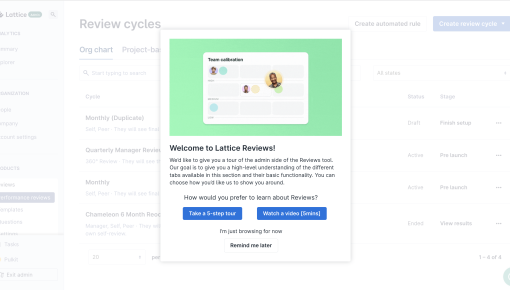
Lattice's Onboarding Tour
Lattice Reviews kicks off with a friendly, “Let’s get you started” vibe, offering a choice between a 5-step...



Existing customer? Sign in
Promote a live demo event directly inside your product, giving users a clear invitation with the event date and time and an easy way to book their spot with a single click. Drive higher attendance by reaching users when they are already engaged.
Only 43% of registered webinar attendees actually show up on event day. While most SaaS companies rely heavily on email campaigns to promote their events, there's a more effective channel hiding in plain sight: your product itself.
Event promotion in-app modals are targeted, contextual invitations that appear directly within your software interface. Unlike emails that compete for attention in crowded inboxes, these modals capture users when they're already engaged with your product, resulting in significantly higher conversion rates and attendance.
In this guide, you'll learn how to create high-converting event promotion modals, implement strategic targeting, and optimize for maximum attendance using proven best practices and advanced personalization techniques.
An event promotion modal is an interactive overlay that promotes upcoming events directly within your product interface. These modals appear as focused pop-ups that temporarily take center stage, ensuring your event announcement gets the attention it deserves.
Compelling Headlines: Create urgency and communicate value immediately. Instead of "Upcoming Webinar," try "Master Advanced Analytics in 45 Minutes" or "See How Top Teams Boost Conversion by 40%."
Clear Event Details: Include essential information without overwhelming users—date, time, duration, and the specific value they'll gain from attending.
Prominent Call-to-Action: Use action-oriented button text like "Reserve My Spot," "Join the Session," or "Get Early Access" rather than generic "Register" buttons.
Product Demos and Webinars: Showcase new features or advanced use cases to drive deeper product adoption.
Feature Launch Events: Generate excitement and early adoption for major product releases.
User Conference Promotions: Drive attendance to annual conferences or virtual summits.
Training Sessions and Workshops: Promote educational content that helps users maximize their investment in your product.
Event promotion modals work because they leverage contextual timing—users see your invitation when they're already thinking about your product. This creates higher engagement rates than email campaigns and enables immediate registration without switching contexts.
Start by establishing clear attendance targets and identifying your ideal audience segments. Are you targeting power users who could benefit from advanced features, or newer users who need foundational training? Your goals will determine everything from copy to targeting rules.
Your headline should immediately communicate value, not just announce an event. Focus on the outcome attendees will achieve rather than the event format itself. For example, "Learn to Build Custom Dashboards in 30 Minutes" is more compelling than "Dashboard Training Webinar."
Define user segments based on engagement level, role, and behavioral patterns. Consider factors like: - Time since last login - Feature usage patterns - Previous event attendance - User role and company size
Maintain visual hierarchy with your most important information prominently displayed. Ensure brand consistency while making the modal visually distinct enough to capture attention. Use contrasting colors for your CTA button and include relevant imagery when possible.
Set up conversion tracking for registration clicks, actual event attendance, and post-event product engagement. This data will be crucial for optimizing future campaigns.
Chameleon's advanced targeting capabilities allow you to create highly personalized event promotions based on real-time user behavior and properties. You can integrate directly with popular event platforms like Livestorm and track the complete user journey from modal view to event attendance and beyond.
Launch your event promotion modals 2-3 weeks before the event date to allow adequate planning time without being too early that users forget. Avoid notification fatigue by limiting modal frequency—showing the same modal daily will annoy users and decrease overall engagement.
Consider user timezone and activity patterns when scheduling modal appearances. B2B users are most active during business hours, while consumer-focused products might see better engagement during evenings or weekends.
Lead with value propositions rather than feature lists. Instead of "Learn about our new reporting dashboard," try "Cut your reporting time in half with automated insights." Create appropriate urgency without being pushy—"Limited seats available" works better than "Last chance!"
Include social proof when available, such as "Join 500+ product managers" or testimonials from previous event attendees. This builds credibility and increases conversion likelihood.
Segment users by engagement level and role within their organization. Power users might be interested in advanced feature demonstrations, while newer users need foundational training sessions.
Exclude users who recently attended similar events to avoid oversaturation. Target users who've recently engaged with related features—someone exploring your analytics section might be perfect for a data visualization webinar.
Use behavioral triggers like specific page visits or feature usage to show contextually relevant event promotions. A user repeatedly accessing integration settings might be ideal for an "Advanced Integrations Workshop."
A/B test different headlines, CTA button text, and value propositions to identify what resonates with your audience. Monitor conversion rates closely and adjust modal frequency based on performance data.
Track post-event engagement metrics to understand the long-term impact of your event promotion strategy. Users who attend events often become more engaged with your product overall.
Track modal view rates and click-through rates to understand initial engagement levels. Monitor event registration conversions to measure how effectively your modal drives desired actions.
Most importantly, track actual event attendance from modal traffic and post-event product engagement to understand the complete impact of your promotion strategy.
Use iterative copy testing to continuously improve performance. Small changes in headline phrasing or CTA button text can significantly impact conversion rates. Adjust timing and frequency based on user feedback and engagement data, and refine audience targeting based on which segments show the highest conversion and attendance rates.
When should I start promoting my event? Begin 2-3 weeks before the event date for optimal results, allowing users time to plan while maintaining urgency.
How often should the modal appear to the same user? Limit exposure to 2-3 times maximum to avoid annoying users while ensuring adequate visibility.
What's the ideal modal size for event promotions? Medium-sized modals (400-500px wide) provide enough space for essential information without overwhelming the interface.
How do I avoid annoying users with event promotions? Use smart targeting, limit frequency, and always provide clear value propositions that justify the interruption.
Can I promote multiple events simultaneously? Yes, but segment audiences carefully and avoid showing multiple event modals to the same users within short timeframes.
Chameleon's no-code modal builder makes creating and optimizing event promotion modals straightforward, while analytics and integrations with analytics tools provide deep insights into user behavior and campaign performance. The platform's seamless integration with popular event platforms like Livestorm and real-time personalization capabilities ensure your event promotions reach the right users at the perfect moment, maximizing both registration and attendance rates.
Start a free trial or talk to our team.
