









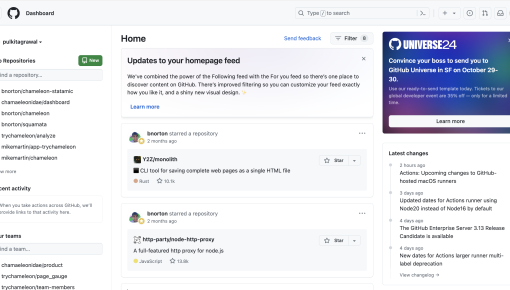
GitHub's Event Promotion Card
An embeddable Card in the GitHub dashboard that promotes an upcoming event and announces a special offer...



Existing customer? Sign in
Sign up for a webinar directly inside the product by entering your email address, making it quick and easy to register while you’re already engaged. Boost event signups by capturing interested users at the right moment.
Only 44% of people who register for webinars actually show up. Even worse? Traditional email campaigns for webinar promotion see conversion rates hovering around 2-3%. But here's what's changing the game: product teams are discovering that in-app webinar registration forms can boost signup rates by up to 40% compared to external landing pages.
An in-app webinar registration form is a contextual signup experience embedded directly within your product interface. Instead of sending users to external pages or relying solely on email blasts, you're capturing registrations at the moment when users are already engaged with your product. This approach transforms webinar promotion from an interruption into a natural extension of the user experience.
Product teams are moving beyond email-only promotion because they've realized something crucial: timing and context matter more than perfect copy. When users are actively exploring a feature that your webinar will cover, that's your golden moment for registration. This strategy delivers higher conversion rates, creates a seamless user experience, and significantly increases actual attendance rates—making it essential for any product-led growth strategy.
With interactive elements and smart targeting, what used to be static registration forms become engaging, personalized experiences that feel like a natural part of your product journey.
An in-app webinar registration form is a registration interface embedded directly within your product experience, allowing users to sign up for webinars without leaving your application. Unlike traditional external landing pages that require users to click through emails and navigate to separate websites, these forms appear contextually within your product interface.
The contextual advantage is significant: users are already engaged with your product, familiar with your interface, and in the right mindset to learn more. This eliminates the friction of context switching and reduces the likelihood of users getting distracted or abandoning the registration process.
In-app webinar registration forms work particularly well for several scenarios:
- Feature announcement webinars that introduce new capabilities users haven't explored yet - Educational training sessions for advanced features or use cases - Product adoption workshops targeting users who haven't fully activated key features - Customer success events for power users looking to maximize their results
Chameleon's Survey features make creating these registration experiences seamless. Instead of building custom forms or disrupting user workflow with pop-ups, you can design elegant registration interfaces that feel native to your product. The targeting capabilities ensure the right users see relevant webinar opportunities at optimal moments in their journey.
Creating an effective in-app webinar registration form requires strategic planning around placement, design, and follow-up automation. Here's your step-by-step process:
1. Identify Optimal Placement Choose high-traffic areas where users are already engaged with related functionality. The best placements include feature-specific pages, post-action moments (after completing a task), or areas where users typically seek additional help or resources. Avoid placing forms on critical workflow pages where they might interrupt important tasks.
2. Design the Registration Flow Keep your registration form simple—email capture should be your primary requirement, with optional fields for role or company size if needed for segmentation. Include compelling webinar titles, clear descriptions of what attendees will learn, and specific value propositions. Your confirmation messaging should set clear expectations about next steps and what to expect.
3. Set Up Targeting Rules Define user segments based on behavior, role, or product usage patterns. Create behavioral triggers that display forms when users interact with features related to your webinar topic. Consider timing carefully—avoid showing forms immediately after login or during onboarding sequences when users are focused on other tasks.
4. Configure Follow-up Sequences Automate confirmation emails with calendar invites, provide pre-webinar resources or preparation materials, and set up reminder sequences for 24 hours and 1 hour before the event.
Using Chameleon's Survey templates, you can build registration forms without any coding. The platform's targeting capabilities let you segment users by behavior, demographics, or product usage patterns.
Technical considerations include ensuring data collection compliance with privacy regulations, integrating with webinar platforms like Livestorm, and setting up proper analytics tracking to measure conversion rates and optimize performance.
Timing & Placement Strategy Trigger registration forms after users complete meaningful actions related to your webinar topic. For example, if you're hosting a webinar about advanced reporting features, display the form after users create their first basic report. Show forms during feature exploration moments when users are actively learning, but avoid interrupting critical workflows like checkout processes or time-sensitive tasks.
Form Design Excellence Minimize required fields—email-only registration often performs best, with optional fields for segmentation purposes. Use compelling webinar titles that clearly communicate value, and include specific agenda highlights rather than vague descriptions. Add social proof through speaker credentials, past attendee testimonials, or registration numbers from previous events. Make your value proposition crystal clear: what specific problem will this webinar solve?
Smart Targeting Strategy Segment users by role, company size, or product usage patterns to ensure relevance. Target users who haven't adopted specific features that your webinar covers—these users have clear motivation to attend. Focus on engaged users who regularly use your product rather than inactive accounts. Consider user lifecycle stage: new users might benefit from foundational webinars, while power users want advanced tactics.
Follow-up Optimization Send immediate confirmation with calendar invites to reduce no-shows. Provide pre-webinar resources like preparation checklists or relevant documentation to increase engagement. Set up reminder sequences at strategic intervals—24 hours before (with agenda details) and 1 hour before (with direct join links). Consider sending a "what you missed" follow-up to no-shows with recording access.
Chameleon's advantages shine in this optimization process. Personalization based on user behavior means adapt your messaging in different form versions based on what features users have or haven't explored. Seamless integration with existing product tours creates natural registration opportunities without feeling promotional. Advanced targeting capabilities work without requiring technical implementation, letting product teams iterate quickly on targeting strategies.
Track these essential KPIs to optimize your in-app webinar registration strategy:
Registration conversion rate measures how many users who see your form actually complete registration. Show-up rate tracks the percentage of registrants who attend the actual webinar—this metric often improves with in-app registration because users feel more connected to your product. Post-webinar product engagement reveals whether attendees increase their product usage after learning new strategies. Feature adoption rates among attendees shows the long-term impact of your educational content.
Chameleon's built-in analytics and integrations with product analytics tools help you refine targeting, improve messaging, and identify the most effective webinar topics for driving product adoption.
How do I customize the webinar registration form template? Chameleon's Survey builder allows complete customization of fields, styling, and messaging to match your brand and webinar requirements.
Can I integrate webinar registration forms with my existing email marketing tools? Yes, Chameleon integrates with popular event platforms and CRM systems to automatically sync registration data.
What's the best timing for displaying webinar registration forms? Display forms after users complete meaningful actions or when they're exploring features related to your webinar topic.
How do I prevent registration forms from disrupting user experience? Use Chameleon's Smart Delay to show forms only at appropriate moments in the user journey.
Ready to transform your webinar registration strategy? Start with Chameleon's in-app webinar registration form template and see how contextual, targeted registration experiences can boost your signup rates and create more engaged webinar audiences.

Start a free trial or talk to our team.
