









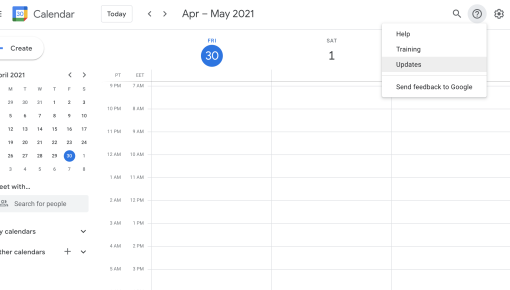
Google Calendar Support Widget
Help widget in the top bar to offer help, product updates, and a link to training resources



Existing customer? Sign in
Get immediate help without leaving the app by clicking a "Talk to us" button that opens a Zendesk chat, making it easy to resolve issues and stay on track.
Picture this: A user is deep in your product, trying to complete a critical workflow, when they hit a roadblock. They're confused, frustrated, and about to abandon the task entirely. Traditional support options require them to leave your app, search through help docs, or wait for email responses. By the time they get help, they've lost momentum—and you've lost an opportunity.
This is where a launch chat in-app modal becomes your secret weapon. Unlike generic chat widgets that sit passively in the corner, a launch chat in-app modal appears at precisely the right moment with contextual support, keeping users engaged and moving forward. It's the difference between reactive and proactive customer support—and it can dramatically improve both user experience and product adoption.
The timing and context of support interactions matter more than most product teams realize. When users need help, they need it immediately and without friction. Chameleon's launch chat modal template transforms these critical moments into opportunities for seamless, integrated support experiences that keep users in your product and on track toward success.
A launch chat in-app modal is a contextual overlay that appears at strategic moments to offer immediate support access without disrupting the user's workflow. Think of it as your support team's way of tapping users on the shoulder at exactly the right time, saying "Hey, need a hand with this?"
The core components of an effective launch chat modal include:
- Heading: "Need help?" - This attention-grabbing, empathetic opener acknowledges the user's potential frustration - Subheading: "We're here to support you and resolve your issues." - This provides reassurance and clearly communicates your value proposition - CTA: "Talk to us" - A clear, action-oriented button that removes any ambiguity about next steps
What makes this approach powerful is the direct integration with support tools like Zendesk. Users can access live chat without leaving your application, maintaining context and momentum. The conversation history, user data, and current page context automatically transfer to your support team, enabling faster, more relevant assistance.
This differs significantly from traditional chat widgets that remain static in your interface. While generic chat widgets are always present (and often ignored), contextual help modals appear when users actually need support. Chameleon's advanced targeting and timing capabilities make these modals far more effective than static solutions by ensuring they appear at moments of genuine need rather than as persistent interface clutter.
The result? Higher engagement rates, faster issue resolution, and users who stay engaged with your product instead of abandoning their tasks.
Setting up an effective in-app support modal requires strategic thinking about user behavior and careful implementation. Here's your step-by-step process:
### 1. Identify Trigger Moments Start by analyzing when users typically need help. Common trigger scenarios include: - Complex feature interactions where users spend excessive time - Error states or failed actions - New user confusion during initial product exploration - Advanced feature adoption attempts - Workflow completion bottlenecks
### 2. Design the Modal Keep your messaging concise and action-focused. Your modal should feel helpful, not intrusive. Use empathetic language that acknowledges user frustration while offering immediate solutions. The visual design should align with your brand while maintaining clear hierarchy and readability.
### 3. Set Up Targeting Rules This is where Chameleon's advanced capabilities shine. Configure targeting based on: - User properties: New vs. returning users, subscription tiers, feature usage patterns - Behavioral triggers: Time spent on page, repeated clicks, scroll patterns - Page context: Specific features, workflow steps, or error pages - User segments: Trial users, power users, or users showing signs of churn risk
### 4. Configure Integration Set up seamless handoff to your support team through Zendesk or other support tools. Ensure user context, current page information, and relevant user data automatically transfer to support agents. This eliminates the need for users to repeat their issues and enables faster resolution.
### 5. Test and Iterate Launch with A/B testing to optimize messaging, timing, and targeting. Test different headlines, trigger conditions, and user segments to find what works best for your specific product and user base.
Chameleon's no-code implementation means you can set this up without developer resources, and real-time customization allows you to refine your approach based on performance data and user feedback.
### Timing & Targeting The key to effective contextual support is precision. Trigger modals after users show clear signs of confusion—extended time on page, repeated clicks on non-interactive elements, or multiple failed attempts at completing actions. However, avoid interrupting active workflows where users are successfully progressing.
Target specific user segments strategically. New users might need more proactive support during onboarding, while power users might only need help with advanced features. Trial users represent a critical segment where timely support can directly impact conversion rates.
### Messaging Optimization Keep headlines empathetic and solution-focused. Instead of generic "Need help?" consider context-specific messaging like "Trouble with this integration?" or "Questions about this feature?" Use action-oriented CTAs that clearly communicate what happens next—"Get help now," "Talk to an expert," or "Resolve this issue."
Personalize messaging based on user context when possible. A user struggling with their first API integration needs different messaging than someone exploring advanced analytics features.
### Design Principles Maintain brand consistency while ensuring your modal stands out enough to capture attention. Use clear visual hierarchy to guide users from problem recognition to action. Ensure the modal works well on different screen sizes, though focus primarily on desktop implementation where most complex product interactions occur.
### Performance Optimization Monitor key metrics including engagement rates, conversion to actual support conversations, and ultimate issue resolution rates. Track user satisfaction scores and gather feedback from your support team about the quality and context of conversations initiated through modals.
Chameleon's comprehensive analytics provide detailed insights into modal performance, while real-time editing capabilities allow you to optimize messaging and targeting without waiting for development cycles.
Launch chat modals excel in specific scenarios where contextual support creates the most value:
New Feature Introductions: Deploy modals during product tours when users encounter complex new functionality. This creates a safety net that encourages feature exploration without fear of getting stuck.
Complex Workflow Assistance: Trigger support options during multi-step processes like integrations, data imports, or configuration tasks where users commonly encounter obstacles.
Error State Recovery: When users hit errors or failed actions, immediately offer support to prevent abandonment and frustration.
Trial User Activation: Proactively offer help to trial users showing signs of confusion or slow progress toward key activation milestones.
Feature Adoption Campaigns: Support users attempting to adopt underutilized features by providing immediate assistance when they encounter difficulties.
Chameleon's ecosystem enables powerful combinations with other engagement tools. Combine launch chat modals with Interactive Demos to offer both self-service and human support options. Use them after Tours to provide additional help for users who need more guidance. Trigger modals based on Survey responses indicating confusion, or deploy them as targeted modals for proactive support outreach.
How do you customize a launch chat modal for different user segments? Chameleon's advanced targeting allows you to customize modals based on user properties, behavior patterns, and contextual factors. Create different modal variants for new users (more proactive, educational messaging) versus power users (focused on advanced troubleshooting). You can also personalize messaging based on subscription tiers, feature usage, or user journey stage.
What's the difference between in-app chat modals and traditional chat widgets? Traditional chat widgets are persistent interface elements that remain visible regardless of user context or need. In-app support modals are contextual—they appear at strategic moments when users actually need help. This contextual approach results in higher engagement rates and more relevant support conversations.
How do you measure the success of in-app support modals? Key metrics include modal engagement rate, conversion to support conversations, issue resolution rate, and user satisfaction scores. Also track broader impact metrics like feature adoption rates, user retention, and support ticket volume to understand the full value of contextual support.
Can you integrate launch chat modals with existing support tools? Yes, Chameleon integrates seamlessly with popular support platforms including Zendesk, Intercom, and others.
When should you trigger a support modal vs. other onboarding elements? Use support modals when users show signs of confusion or struggle, while using other elements like Tours for proactive education. The key is orchestrating these touchpoints to create a comprehensive user experience that provides the right type of help at the right moment.
Ready to transform your support experience? Explore Chameleon's launch chat modal template and discover how contextual support can reduce friction while improving user satisfaction and product adoption.
Start a free trial or talk to our team.
