









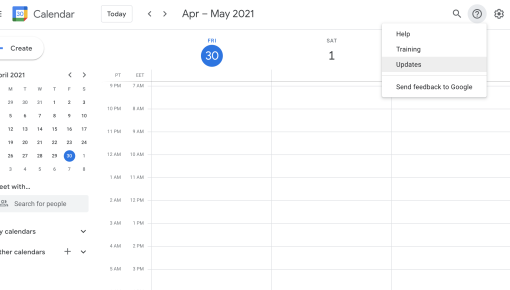
Google Calendar Support Widget
Help widget in the top bar to offer help, product updates, and a link to training resources



Existing customer? Sign in
Connect users to instant in-app support by prompting them with a clear message and a "Talk to us" button that opens a Help Scout chat, making it easy to get help and resolve issues without leaving the product.
Modern SaaS products face a critical challenge: users often struggle silently with features before abandoning them entirely. While traditional chat widgets sit passively in corners waiting for users to reach out, in-app chat modals take a proactive approach by appearing at precisely the right moment in a user's journey. These contextual support touchpoints can dramatically reduce friction in user experiences while boosting product adoption rates.
A launch chat in-app modal is essentially your product's way of saying "Hey, need help with this?" before users even realize they're stuck. Unlike reactive support systems, these modals anticipate user needs and offer assistance when it matters most. When integrated with platforms like Help Scout Messenger, they create seamless bridges between your product experience and your support team, ensuring users get help without breaking their workflow.
For product teams looking to reduce churn and improve user success, implementing strategic chat modals isn't just nice-to-have—it's becoming essential for competitive SaaS products.
A launch chat in-app modal is a contextual overlay that proactively initiates customer support conversations at strategic moments in your product experience. Unlike generic chat widgets that remain static on your page, these modals appear dynamically based on user behavior, page context, or specific triggers you define.
The key difference lies in timing and intent. Traditional chat widgets are reactive—they wait for users to recognize they need help and take action. In-app chat modals are proactive—they anticipate friction points and offer assistance before users become frustrated or confused.
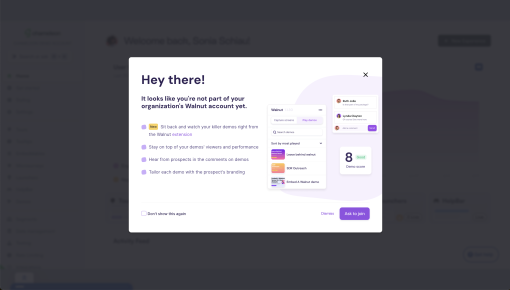
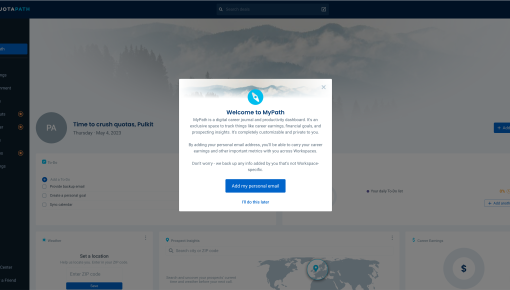
Core components of an effective launch chat modal include: - Compelling headline that addresses the user's likely concern - Clear subheading that explains what help is available - Prominent CTA button that launches the chat interface - Strategic positioning that doesn't disrupt the user's primary task
These modals typically appear during critical moments like feature discovery, complex workflows, or when users exhibit hesitation behaviors (like hovering without clicking or spending excessive time on a page). They're particularly powerful during user onboarding sequences, where timely support can mean the difference between successful adoption and early churn.
The connection to lifecycle education is crucial here. Rather than treating support as a separate function, launch chat modals integrate assistance directly into your product's educational flow, creating a more cohesive user experience.
Creating effective in-app chat modals requires both strategic thinking and technical implementation. Here's how to approach the setup process systematically.
Step 1: Define Your Trigger Strategy Start by identifying where users typically encounter friction in your product. Analyze support ticket patterns, user session recordings, and drop-off points to pinpoint optimal modal placement. Common trigger scenarios include: - First-time feature access - Complex multi-step processes - Pages with high bounce rates - After failed actions or error states
Step 2: Set Up Your Modal in Chameleon Chameleon's no-code builder makes modal creation straightforward for product teams. Navigate to the Templates section and select the Launch Chat Modal template. The builder allows you to: - Customize messaging and design to match your brand - Set precise targeting rules based on user segments - Configure timing parameters (immediate, delayed, or behavior-triggered) - Preview the modal across different screen sizes and contexts
Step 3: Configure Help Scout Integration The Help Scout Messenger integration enables seamless handoffs from your modal to live support conversations. In your Chameleon dashboard: - Connect your Help Scout account by pasting in your API key in the integrations dashboard
Step 4: Implement Advanced Targeting Chameleon's targeting capabilities let you show modals to specific user segments based on: - User properties (plan type, signup date, feature usage) - Behavioral triggers (page visits, time spent, click patterns) - Lifecycle stage (trial users, new customers, power users) - Geographic or demographic data
Step 5: Test and Optimize Before launching, use Chameleon's preview functionality to test your modal across different user scenarios. Set up A/B tests to compare different messaging approaches, and establish baseline metrics for engagement and conversion rates.
Successful chat modal implementation requires careful attention to timing, messaging, and user experience design.
Timing Is Everything The most effective modals appear when users are most likely to need help, not when it's convenient for your support team. Trigger modals after users spend more than 30 seconds on complex pages, when they access advanced features for the first time, or when they exhibit signs of confusion like rapid clicking or page refreshing.
Craft Compelling, Contextual Messaging Your modal headline should directly address the user's likely concern. Instead of generic "Need help?" messages, use specific language like "Questions about setting up your first automation?" or "Want to walk through this feature together?" The subheading should clearly explain what type of assistance is available and set expectations for response time.
Target Strategically, Not Broadly Avoid modal fatigue by showing chat prompts only to users who genuinely need assistance. New users during their first week might benefit from proactive support, while power users might find frequent modals intrusive. Use Chameleon's advanced targeting to create nuanced rules that respect user preferences and behavior patterns.
Design for Seamless Integration Your chat modal should feel like a natural part of your product experience, not an interruption. Maintain consistent branding, use appropriate sizing that doesn't overwhelm the interface, and ensure the modal can be easily dismissed if users prefer to continue independently.
Optimize the Support Handoff When users click through to chat, provide your support team with relevant context automatically. Include information about the user's current page, recent actions, account details, and any relevant product usage data. This preparation enables more efficient and personalized support conversations.
Measure and Iterate Track key metrics including modal engagement rates, chat initiation rates, conversation resolution times, and user satisfaction scores. Chameleon's analytics dashboard and integrations with analytics tools provide detailed insights into modal performance, helping you identify which triggers and messaging approaches work best for different user segments.
The platform's A/B testing capabilities allow you to experiment with different approaches systematically, comparing everything from headline copy to trigger timing to find optimal configurations for your specific user base.
Launch chat modals excel in specific scenarios where proactive support can significantly impact user success and product adoption.
Onboarding Support for New Users During the critical first-week experience, new users often encounter features or concepts that aren't immediately intuitive. Strategic chat modals can offer assistance during key setup steps, helping users complete essential configurations without frustration. This proactive approach often prevents the silent churn that occurs when users abandon setup processes midway.
Feature Adoption Assistance When launching new features or trying to drive adoption of underutilized capabilities, chat modals can provide just-in-time education and support. Rather than relying solely on documentation or help articles, you can offer live assistance to walk users through new functionality, increasing both adoption rates and user confidence.
Complex Workflow Support Multi-step processes like integrations, data imports, or advanced configurations benefit significantly from proactive chat support. Modals can appear at decision points or when users pause during complex workflows, offering guidance that keeps momentum moving forward.
Reducing Support Ticket Volume By addressing common questions proactively, well-placed chat modals can actually reduce overall support burden while improving user experience. Users get immediate assistance instead of waiting for email responses, and support teams can resolve issues more efficiently with real-time context.
Lifecycle Education Touchpoints Chat modals work particularly well as part of broader lifecycle education campaigns, complementing Chameleon's Interactive Demos and product tours. They provide a human touchpoint in otherwise automated educational sequences, adding warmth and personalization to user onboarding.
How do I customize the chat modal messaging? Chameleon's template builder allows complete customization of headlines, subheadings, button text, and visual design. You can also create multiple variations for A/B testing different messaging approaches with your user base.
Can I target specific user segments with chat modals? Yes, Chameleon's advanced targeting lets you show modals based on user properties, behavioral triggers, lifecycle stage, and custom attributes. This ensures relevant users see appropriate support offers without overwhelming others.
What metrics should I track for chat modal performance? Key metrics include modal view rates, click-through rates to chat, conversation initiation rates, resolution times, and user satisfaction scores. Chameleon's analytics dashboard and integrations with analytics tools provide detailed performance data for optimization.
How often should I trigger support modals? Frequency depends on your user base and product complexity. Generally, limit modals to high-impact moments and respect user preferences. Chameleon's targeting rules can help you avoid modal fatigue while ensuring assistance is available when needed.
Can I A/B test different modal variations? Absolutely. Chameleon's built-in A/B testing capabilities let you compare different headlines, timing strategies, targeting rules, and design approaches to optimize performance for your specific audience.
Ready to implement proactive chat support that actually helps your users succeed? Try Chameleon's Launch Chat Modal template and see how contextual assistance can transform your product experience.
Start a free trial or talk to our team.
