









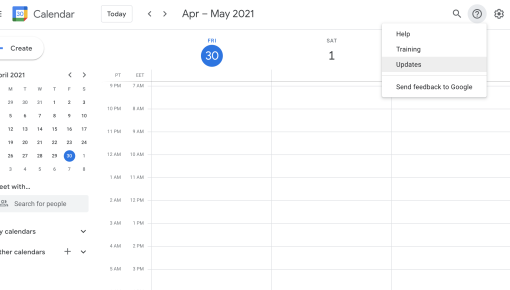
Google Calendar Support Widget
Help widget in the top bar to offer help, product updates, and a link to training resources



Existing customer? Sign in
Connect users to instant in-app support by showing a helpful modal with a clear "Talk to us" button that opens Intercom Messenger, making it easy for users to get help right when they need it. Reduce user frustration and abandonment by offering immediate assistance during critical moments in your product.
Picture this: A user is deep in your product, trying to complete a critical task, when they hit a roadblock. They look around for help, can't find it quickly, and... they're gone. This scenario plays out thousands of times daily across SaaS products, costing companies both conversions and customer satisfaction.
The launch chat in-app modal template solves this exact problem by providing proactive, contextual access to support exactly when users need it most. Unlike passive help centers or buried contact forms, this template creates an instant bridge between user confusion and expert assistance. When implemented strategically, it transforms moments of friction into opportunities for engagement, dramatically improving both product adoption rates and user experience.
This comprehensive guide will show you how to implement, optimize, and measure success with in-app support modals that actually drive results.
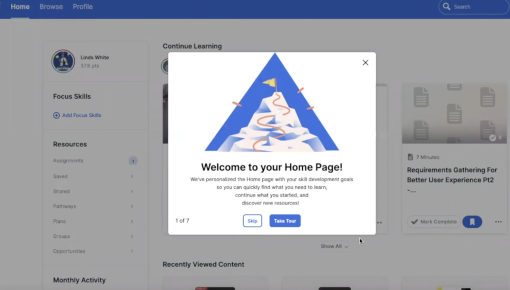
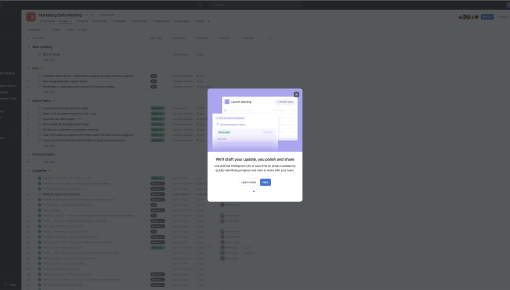
A launch chat in-app modal is a contextual overlay that appears within your product interface to provide instant access to support chat functionality. Think of it as a proactive helping hand that appears precisely when users show signs of needing assistance.
The modal typically consists of three key components: a compelling headline like "Need help?", a brief subheading that explains the value proposition, and a clear call-to-action button that launches your support chat system. What makes this different from traditional support widgets is the intelligent timing and targeting—instead of sitting passively in a corner, the modal appears based on specific user behaviors or contextual triggers.
Unlike static help centers or always-visible chat widgets, the launch chat in-app modal leverages behavioral data to surface at optimal moments. Chameleon's advanced targeting capabilities make this particularly powerful, allowing you to trigger modals based on complex user journeys, time spent on specific pages, or even integration data from your product analytics.
The modal creates a seamless transition from product confusion to human assistance, maintaining context while providing immediate relief for stuck users.
The business impact of strategic support modal implementation extends far beyond simple customer service metrics. Research consistently shows that users who can quickly access help during critical workflows are significantly more likely to complete onboarding and become long-term customers.
In-app support modals directly address user abandonment during complex workflows—those make-or-break moments where users either push through challenges or give up entirely. By providing instant access to expert assistance, you're essentially adding a safety net that catches users before they fall out of your funnel.
The proactive nature of these modals also reduces overall support ticket volume by connecting users to real-time assistance before small questions become major frustrations. This creates a win-win scenario: users get faster resolution, and your support team handles fewer reactive tickets.
Perhaps most importantly, in-app support modals significantly improve onboarding completion rates. New users facing their first complex task with immediate support access are far more likely to push through initial learning curves and reach their first "aha moment" with your product.
Setting up an effective launch chat modal starts with identifying the right trigger points in your user journey. Look for moments where users typically hesitate—complex form submissions, first-time feature usage, or pages with historically high bounce rates.
The key is balancing proactive assistance with user autonomy. Effective triggers include time-based conditions (user spending more than 60 seconds on a complex page), behavioral signals (multiple clicks without progression), or specific user segments (trial users encountering premium features).
Customizing messaging for different user segments dramatically improves engagement rates. New users might see "Getting started? We're here to help," while power users encountering advanced features might see "Questions about this workflow? Chat with our experts."
For Intercom integration specifically, Chameleon's template connects seamlessly with your existing Intercom setup.
Chameleon's no-code setup process means product teams can implement and iterate on modal configurations without developer resources. Advanced targeting capabilities allow for sophisticated rules like "show to trial users who haven't completed onboarding after visiting the integrations page twice."
The built-in A/B testing functionality lets you optimize modal timing, messaging, and design based on actual engagement data rather than assumptions.
Timing is everything with in-app support modals. The sweet spot is appearing helpful without being intrusive—typically after users have had enough time to attempt self-service but before frustration sets in. A 45-60 second delay on complex pages often works well, but this varies by product complexity.
Compelling modal copy focuses on immediate value rather than generic help offers. Instead of "Need help?", try "Stuck on this step? Get unstuck in 30 seconds" or "Questions about integrations? Our experts are standing by." The messaging should acknowledge the specific context where users find themselves.
Visual design should complement your product's existing interface while standing out enough to be noticed. Subtle animations and consistent brand colors maintain user flow while ensuring the modal feels like a natural part of the experience rather than an interruption.
Targeting the right user segments maximizes impact while minimizing annoyance. New users during onboarding, trial users exploring advanced features, and existing customers encountering new functionality typically benefit most from proactive support access.
Advanced strategies include personalizing modals based on user behavior patterns, using progressive disclosure to offer increasingly specific help options, and combining support modals with other Chameleon features like Tours for comprehensive user assistance.
Effective measurement goes beyond simple modal click-through rates to focus on downstream impact. Key metrics include modal engagement rates, support conversation initiation, user progression after modal interaction, and overall support satisfaction scores.
The most important metric is often user progression—did users who engaged with the modal successfully complete their intended task? This connects support accessibility directly to product adoption outcomes.
Chameleon's built-in analytics and integrations with analytics tools and CRMs provide detailed insights into modal performance, including engagement rates by user segment, optimal timing analysis, and conversion tracking from modal interaction to task completion. This data enables continuous optimization based on real user behavior rather than guesswork.
How do I customize the chat modal design? Chameleon's template editor allows full customization of colors, fonts, messaging, and button styles to match your brand while maintaining optimal conversion rates.
When should the support modal appear? Optimal timing varies by product, but generally after 45-60 seconds on complex pages or when users show behavioral signs of confusion like repeated clicks without progression.
Can I integrate with other support tools besides Intercom? Yes, Chameleon supports integrations with other major support platforms including Zendesk and Help Scout.
How do I measure modal effectiveness? Focus on downstream metrics like task completion rates and user progression rather than just click-through rates. Chameleon provides comprehensive analytics and integrations for optimization.
What's the difference between this and a help widget? Unlike static widgets, launch chat modals appear contextually based on user behavior and can pass specific context to support teams for more effective assistance.
The launch chat in-app modal template transforms support from a reactive afterthought into a proactive growth driver. When users know help is immediately available, they're more likely to explore advanced features, complete complex workflows, and ultimately become successful, long-term customers.
Start a free trial or talk to our team.
