









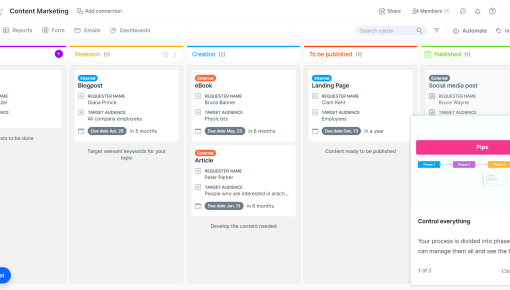
Pipefy Product Tour
A 3-step tour built with Chameleon that takes the user through the core features of Pipefy.



Existing customer? Sign in
Book a call directly inside the app to quickly connect with a team member and get your questions answered, without leaving your product experience. Schedule a conversation instantly through the in-app HubSpot calendar for fast, personalized support.
In the world of product-led growth, the most successful SaaS companies have mastered the art of creating seamless touchpoints between their users and teams. One of the most effective tools in this arsenal is the in-app call booking modal—a strategic overlay that transforms passive product usage into active customer conversations.
Unlike traditional contact forms or external scheduling pages that pull users away from your product, in-app call booking modals create direct communication channels within the user experience itself. For product teams focused on driving engagement and sales conversions, these modals represent a critical bridge between product adoption strategies and customer success workflows.
The beauty of in-app call booking lies in its contextual timing. When users encounter a complex feature, consider an upgrade, or need guidance, they can instantly schedule a conversation without losing momentum in their product journey. With HubSpot integration capabilities, these modals become even more powerful, automatically syncing scheduled calls with your existing sales and customer success processes.
An in-app call booking modal is an interactive overlay that enables users to schedule calls directly within your product interface, eliminating the friction of external booking pages or lengthy email exchanges. Think of it as your product's built-in concierge service—always available when users need human support or guidance.
The anatomy of an effective call booking modal includes three core components: a compelling heading that clearly states the value proposition, a supportive subheading that addresses user concerns or benefits, and a prominent CTA button that initiates the booking process. This simple structure ensures users understand exactly what they're getting and why it matters.
What sets in-app call booking modals apart from traditional scheduling methods is their contextual relevance. Instead of generic "Contact Us" pages, these modals appear at precisely the right moments in the user journey—when someone's exploring a premium feature, struggling with implementation, or showing signs of high engagement that indicate upgrade potential.
The benefits are substantial: reduced friction leads to higher conversion rates, contextual timing improves booking quality, and seamless integration maintains user flow. Common use cases span the entire customer lifecycle, from onboarding support for complex features to upgrade conversations with high-value prospects, customer success check-ins for retention, and technical support escalation when users need immediate assistance.
For SaaS user experience optimization, call booking modals represent a perfect blend of self-service and human touch—letting users choose when they need direct support while keeping them engaged within your product ecosystem.
Setting up an effective in-app call booking modal requires strategic thinking about timing, messaging, and technical integration. Here's your step-by-step implementation guide:
Step 1: Choose Optimal Trigger Points The success of your call booking modal depends heavily on when it appears. Focus on high-intent moments: when users discover premium features they can't access, spend extended time on upgrade pages, click help documentation repeatedly, or reach specific engagement milestones that indicate readiness for deeper conversations.
Step 2: Craft Compelling Copy Your modal template should follow this proven structure: "Book a call with us 📞" as your action-oriented heading, paired with a benefit-focused subheading like "Get personalized guidance to maximize your results" or "Speak with our team about upgrading your plan." Keep copy concise but compelling—users should immediately understand the value they'll receive.
Step 3: Configure HubSpot Integration Seamless calendar access is crucial for conversion. Configure your HubSpot integration to automatically sync booked calls with your sales and customer success teams, ensuring proper lead routing and follow-up workflows. This integration eliminates manual data entry and ensures no opportunities slip through the cracks.
Step 4: Design Considerations Modal placement should feel natural within your product's visual hierarchy. Consider timing delays to avoid interrupting critical user actions, and ensure your modal design aligns with your product's existing UI patterns. The goal is enhancement, not disruption.
Step 5: Testing and Optimization Implement A/B testing for different copy variations, trigger timing, and visual designs. Track not just booking rates but also show rates and conversion to closed deals—the full funnel matters for measuring success.
Chameleon's advanced targeting capabilities ensure your call booking modals appear to the right users at precisely the right moments.
Successful in-app call booking requires more than just technical implementation—it demands strategic thinking about user psychology and journey optimization.
Timing is Everything Present modals after users experience value or encounter meaningful friction. The sweet spot is when someone has engaged enough to understand your product's potential but needs guidance to unlock its full value. Avoid interrupting active workflows or appearing immediately upon login.
Personalization Drives Results Segment your messaging based on user journey stage and behavior patterns. New users might see "Get help setting up your first project," while power users could see "Discuss advanced features with our team." This targeted approach significantly improves booking rates and call quality.
Copy Optimization Principles Keep headings action-oriented and subheadings benefit-focused. Instead of generic "Schedule a demo," try "See how [specific feature] can solve [specific problem]." The more relevant and specific your messaging, the higher your conversion rates.
Integration Strategy Connect your call booking workflow with existing customer success processes. Ensure booked calls automatically trigger appropriate team notifications, CRM updates, and follow-up sequences. This integration prevents leads from falling through cracks and maintains momentum from booking to conversation.
Measurement and Analytics Track comprehensive metrics beyond just booking rates. Monitor show rates, conversion to closed deals, and user satisfaction scores from post-call surveys. These insights help you refine both your modal strategy and the actual call experience.
Chameleon's advanced targeting and segmentation capabilities make personalization effortless, while integration with other Chameleon features like Surveys enables pre-call qualification and Tours can guide users through the booking process. The platform's real-time analytics provide actionable insights for continuous optimization.
In-app call booking modals excel across various customer lifecycle stages and business scenarios. During user onboarding optimization, modals can offer personalized assistance when users encounter complex features or integration challenges, dramatically reducing time-to-value and improving activation rates.
For upgrade conversations, high-value prospects who repeatedly visit pricing pages or explore premium features represent perfect candidates for strategic call booking prompts. These contextual conversations often convert at much higher rates than cold outreach.
Customer success check-ins become more effective when triggered by usage patterns indicating potential churn risk or expansion opportunities. Technical support escalation through call booking modals provides a premium support experience while reducing ticket volume for complex issues that benefit from real-time conversation.
Product feedback and roadmap discussions with engaged power users can be initiated through targeted modals, creating valuable input for product development while strengthening customer relationships.
How do I customize the call booking modal template? Chameleon offers extensive customization options for copy, design, and targeting rules. Focus on aligning the modal's appearance with your product's existing UI patterns while ensuring the messaging resonates with your specific user segments.
What's the best time to show a call booking modal? Optimal timing depends on user behavior and journey stage. Generally, present modals after users have experienced some product value but before they encounter significant friction. Avoid interrupting active workflows or critical user actions.
How do I measure call booking modal performance? Track the full funnel: modal impression rates, booking conversion rates, show rates for scheduled calls, and ultimate conversion to closed deals or desired outcomes. This comprehensive measurement approach helps optimize both the modal and the actual call experience.
Can I integrate call booking modals with other tools besides HubSpot? Yes, most modern platforms support integrations with popular CRM and scheduling tools like Salesforce, Calendly, and others. The key is ensuring seamless data flow between your product, booking system, and customer success workflows.
How often should I show call booking modals to users? Frequency should be based on user behavior and engagement patterns rather than arbitrary time intervals. Implement smart suppression rules to avoid modal fatigue while ensuring high-intent moments aren't missed. Most successful implementations show modals based on specific trigger events rather than time-based schedules.
Ready to implement in-app call booking modals that drive real results? Chameleon's comprehensive platform makes it easy to create, target, and optimize call booking experiences that seamlessly integrate with your existing product-led growth strategy.
Start a free trial or talk to our team.
