









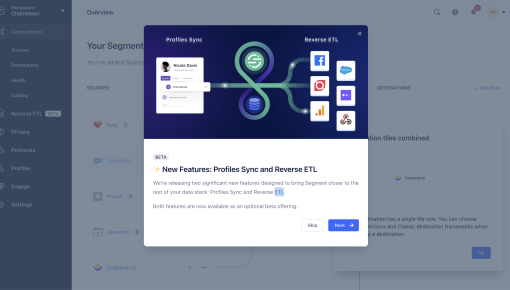
Segment's New Feature Tour
This Segment (by Twilio) efficiently spotlights two key features: Profiles Sync and Reverse ETL. It bridges...



Existing customer? Sign in
Book a call with your team directly inside the product, making it easy for users to connect and schedule a conversation without leaving their workflow. Encourage interested users to reach out at the right moment by showing a clear, in-app booking option.
Picture this: A user just completed their third successful workflow in your product, clearly seeing value, and you know they're prime for a sales conversation. But instead of hoping they'll eventually fill out a contact form buried in your footer, you present them with a seamless way to book a call right within their product experience. That's the power of in-app call booking modals—and it's transforming how product-led companies convert engaged users into sales conversations.
The shift from traditional lead capture to product-led sales has fundamentally changed when and how we approach potential customers. Instead of interrupting cold prospects with outbound calls, smart product teams now identify the perfect moment when users are experiencing value and make it effortless for them to connect with sales. In-app call booking modals solve the critical challenge of converting product-qualified leads (PQLs) without disrupting the user experience that got them engaged in the first place.
With Chameleon's no-code call booking modal template, product teams can implement this powerful conversion tool in minutes, not weeks—no engineering resources required.
An in-app call booking modal is a targeted overlay that appears within your product interface, allowing users to schedule sales or support calls without leaving their current workflow. Unlike external booking flows that redirect users to separate pages or tools, these modals maintain context and momentum by keeping users within the familiar product environment.
The core components include a compelling headline that speaks to the user's current state, a brief value proposition for the call, an embedded scheduling widget (typically Calendly or similar), and clear next steps. What makes these modals particularly effective is their ability to leverage real-time user behavior and product usage data to appear at precisely the right moment.
Product teams typically deploy in-app call booking modals as part of broader product-led growth strategies. They're especially powerful for SaaS companies looking to convert freemium users to paid plans, guide trial users toward purchase decisions, or connect high-value prospects with customer success teams. The key difference from traditional lead capture is timing—these modals appear when users are already experiencing value, making them far more receptive to sales conversations.
Chameleon's modal templates eliminate the complexity of custom development, offering pre-built designs optimized for conversion with seamless integration capabilities. This means product teams can focus on strategy and optimization rather than technical implementation.
Setting up an in-app call booking modal with Chameleon is refreshingly straightforward. Start by accessing the modal template library and selecting the call booking template that best matches your use case. The template comes pre-configured with conversion-optimized copy and design elements, but everything is fully customizable to match your brand and messaging.
The Calendly integration walkthrough guides you through connecting your scheduling tool in just a few clicks. Simply paste your Calendly API key, and Chameleon handles the technical integration automatically. The system supports other popular scheduling tools as well, including Chili Piper and Hubspot Meetings.
Targeting and trigger configuration is where the real power emerges. Define exactly which users should see the modal based on behavioral triggers like feature adoption milestones, usage frequency, or specific page visits. For example, you might target users who've completed onboarding and used three core features, or trial users approaching their expiration date who've demonstrated high engagement.
Customization options let you tailor every element—from headline copy and call-to-action buttons to visual design and timing delays. The no-code editor makes it simple to test different variations and find what resonates with your specific audience.
The entire setup process requires no engineering resources and can be completed in under 30 minutes. Chameleon's testing and preview functionality lets you see exactly how the modal will appear to users before going live, ensuring a polished experience from day one.
Timing is everything when it comes to in-app call booking modals. The most effective implementations trigger modals at moments of demonstrated value or engagement. Consider showing modals after users complete key onboarding steps, achieve their first success milestone, or exhibit usage patterns indicating they're ready for expansion conversations. Avoid interrupting users during critical workflows—instead, wait for natural pause points or completion states.
Targeting should focus on users most likely to benefit from sales conversations. High-engagement trial users, freemium users approaching usage limits, and accounts showing expansion signals are prime candidates. Use Chameleon's advanced segmentation to create precise audience definitions based on product usage, company attributes, and behavioral patterns.
Copy should be conversational and value-focused rather than sales-heavy. Headlines like "Ready to unlock advanced features?" or "Let's discuss scaling your workflow" perform better than generic "Book a demo" messaging. Your call-to-action should clearly communicate what users will gain from the conversation—whether it's personalized setup, advanced training, or custom solutions.
Design best practices emphasize clarity and trust. Use your product's existing design language to maintain consistency, include team member photos to add a human element, and keep the modal focused with minimal form fields. The scheduling widget should be the primary focus, with supporting copy that reinforces value without overwhelming the interface.
Follow-up experience matters just as much as the initial modal. Immediately after booking, show confirmation messaging that sets expectations for the call and provides relevant resources. Consider using Chameleon's Tours to share helpful preparation materials or guide users through features you'll discuss on the call.
Chameleon's A/B testing capabilities let you optimize every element systematically, from trigger timing to copy variations, ensuring continuous improvement in conversion rates.
Track key metrics including modal view rates, booking conversion rates, and ultimately, sales conversion from booked calls. Integration with product analytics tools provides deeper insights into which user segments and behavioral triggers drive the highest-quality conversations.
A/B testing should focus on high-impact elements like trigger timing, headline copy, and visual design. Test one variable at a time to isolate what drives improvement, and give tests sufficient time to reach statistical significance.
ROI measurement for sales teams should connect modal bookings to pipeline generation and closed revenue. This data helps justify the investment in product-led sales tools and guides expansion to additional use cases.
How do I integrate Calendly with my product? Chameleon's template includes built-in Calendly integration—simply paste in your Calendly API key during setup, and the system handles the technical connection automatically.
When should I show call booking modals to users? Target users who've demonstrated value realization through product usage, such as completing onboarding, achieving success milestones, or showing expansion signals like approaching usage limits.
Can I customize the modal design and copy? Yes, Chameleon's templates are fully customizable. Modify headlines, copy, colors, and layout to match your brand while maintaining conversion-optimized structure.
How do I track conversions from in-app booking? Chameleon provides built-in analytics for modal performance, and integrations with tools like Salesforce and HubSpot let you track the full funnel from booking to closed revenue.
What's the difference between modals and embedded calendars? Modals appear as targeted overlays at specific moments, while embedded calendars are always visible on pages. Modals are more effective for product-led sales because they leverage behavioral triggers and maintain user context.
Ready to transform how your product converts engaged users into sales conversations? Try Chameleon's call booking modal template and start driving revenue from your product experience today.
Start a free trial or talk to our team.
