









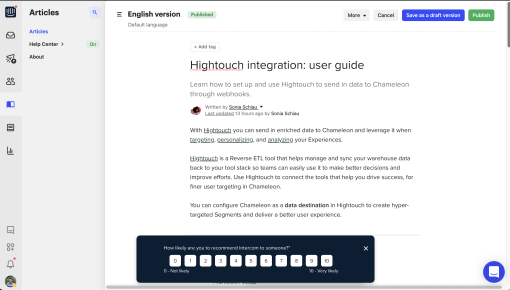
Intercom's NPS Survey
Intercom nails subtlety with this NPS survey. It slides in at the bottom without interrupting your flow,...



Existing customer? Sign in
Measure how satisfied users are with a specific feature by asking them how likely they are to recommend it on a scale from 1 to 10, helping you understand which features work well and which need improvement.
Product teams often struggle to understand which features truly resonate with users. While traditional NPS surveys provide valuable insights about overall product satisfaction, they miss the nuanced feedback needed to improve individual features. A feature NPS survey changes this by focusing on specific product capabilities, giving you targeted insights that drive better product decisions.
Unlike general NPS surveys that ask about your entire product, feature NPS surveys zero in on particular functionalities using a simple 1-10 rating scale. This approach delivers actionable data about feature performance, user satisfaction levels, and improvement opportunities that directly impact feature adoption and user retention.
A feature NPS survey is a targeted feedback tool that measures user satisfaction with specific product features rather than your entire product experience. Instead of asking "How likely are you to recommend our product?" you ask "How likely are you to recommend this feature to a colleague?"
The key difference from traditional NPS lies in specificity. While standard NPS surveys capture broad sentiment about your product, feature NPS surveys provide granular insights about individual capabilities. This targeted approach uses the same 1-10 scale methodology, where responses of 9-10 indicate promoters, 7-8 represent passives, and 0-6 are detractors.
Product teams use feature NPS surveys during critical moments in the user journey—immediately after feature interaction, following onboarding sequences, or during feature adoption campaigns. This timing captures authentic reactions while the experience remains fresh in users' minds.
The connection between feature NPS and product development cycles is direct. These surveys identify which features drive satisfaction, which need improvement, and which might be candidates for enhancement or removal. This data becomes invaluable for prioritizing product roadmaps and allocating development resources effectively.
Creating effective feature NPS surveys starts with strategic feature selection. Focus on features that are core to your value proposition, newly launched capabilities, or functionalities with unclear adoption patterns. Avoid surveying every feature—instead, prioritize those that significantly impact user success or business outcomes.
Setup Process: - Identify features based on usage data and business importance - Time surveys for 24-48 hours after meaningful feature interaction - Target users who have engaged with the feature at least twice - Segment audiences by user tenure, plan type, or usage patterns
Chameleon Implementation: Chameleon's Survey builder makes feature NPS implementation straightforward. The no-code builder lets you customize the 1-10 button layout to match your brand while maintaining survey effectiveness. Set up trigger conditions based on specific user actions—like completing a workflow or spending time in a feature area.
The platform's advanced targeting ensures surveys appear contextually. You can trigger surveys when users exit a feature, complete specific tasks, or reach usage milestones. This contextual approach increases response rates and data quality.
Launch Considerations: Generally, limit feature NPS surveys to once per quarter per user, though high-engagement features might support monthly surveying. Monitor response rates and adjust frequency based on user feedback and completion data.
Survey Design Excellence: Keep surveys contextual by triggering them immediately after feature use. This timing captures authentic reactions while the experience remains vivid. Always include follow-up questions for detractors—understanding why someone wouldn't recommend a feature provides more actionable insights than the score alone.
Segment responses by user characteristics like tenure, plan level, or feature expertise. New users might rate features differently than power users, and these distinctions inform different improvement strategies.
Analysis and Action: Establish feature-specific benchmarks rather than applying general NPS standards. A new feature might reasonably score lower than established capabilities while still indicating positive trajectory. Track scores over time to identify trends and measure improvement efforts.
Connect NPS scores with feature usage data to understand the relationship between satisfaction and engagement. High satisfaction with low usage might indicate discovery problems, while high usage with low satisfaction suggests usability issues.
Create systematic feedback loops with your product development team. Share feature NPS results in regular product reviews and use the data to inform sprint planning and feature prioritization decisions.
Chameleon Advantages: Chameleon's real-time response tracking lets you monitor survey performance and adjust targeting immediately. The platform's integration with product analytics tools allows you to create comprehensive user profiles that combine satisfaction data with behavioral insights.
Automated follow-up surveys based on initial responses help you dig deeper into user sentiment. Set up conditional logic to ask different questions based on NPS scores, creating personalized survey experiences that gather richer feedback.
When should I send a feature NPS survey? Send surveys 24-48 hours after meaningful feature interaction, when the experience is fresh but users have had time to process the value. Avoid surveying during onboarding stress or immediately after error states.
How often should I survey users about features? Limit feature-specific surveys to quarterly intervals per user to prevent survey fatigue. High-engagement features in active development might support monthly surveying, but monitor response rates carefully.
What's a good NPS score for a new feature? New features typically score 10-20 points lower than established capabilities. Focus on trend direction rather than absolute scores—consistent improvement over 2-3 survey cycles indicates healthy feature development.
Can I customize the survey questions? Yes, Chameleon's survey builder allows complete customization while maintaining NPS methodology. Add follow-up questions, customize button text, and adjust visual styling to match your brand.
How do I analyze feature NPS results? Segment responses by user type and track trends over time. Compare scores across features to identify relative performance and prioritize improvement efforts based on both satisfaction levels and feature importance.
What's the difference between feature NPS and feature satisfaction surveys? Feature NPS specifically measures recommendation likelihood using the standard 1-10 scale, while satisfaction surveys might use different scales or question formats. NPS provides standardized benchmarking capabilities across features and time periods.
Feature NPS surveys excel in several strategic scenarios beyond basic satisfaction measurement. Use them immediately after feature launches to gauge initial reception and identify improvement priorities. The data helps determine whether new capabilities meet user expectations and warrant continued investment.
For feature sunset decisions, NPS scores provide objective data about user attachment to capabilities you're considering removing. Low scores might support deprecation decisions, while unexpectedly high scores could indicate hidden value worth preserving.
Competitive feature benchmarking becomes possible when you survey users familiar with alternative solutions. Ask about recommendation likelihood for your feature versus competitors to understand relative positioning.
User onboarding optimization benefits from feature NPS data by identifying which capabilities create positive first impressions. Focus onboarding sequences on high-scoring features while improving or de-emphasizing problematic ones.
Feature adoption improvement initiatives gain direction from NPS insights. Low scores combined with low usage suggest fundamental problems, while low scores with high usage indicate usability issues that targeted improvements can address.
This template provides the foundation for systematic feature feedback collection that drives product decisions with user-centered data. Start with your most important features and expand coverage as you build confidence in the process and see results from initial implementations.
Start a free trial or talk to our team.
