









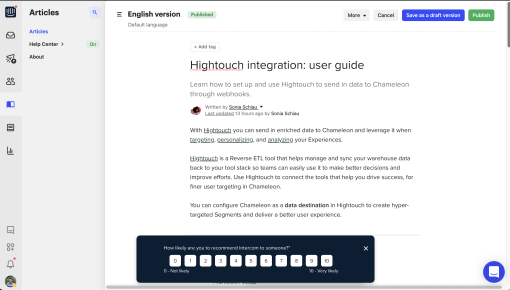
Intercom's NPS Survey
Intercom nails subtlety with this NPS survey. It slides in at the bottom without interrupting your flow,...



Existing customer? Sign in
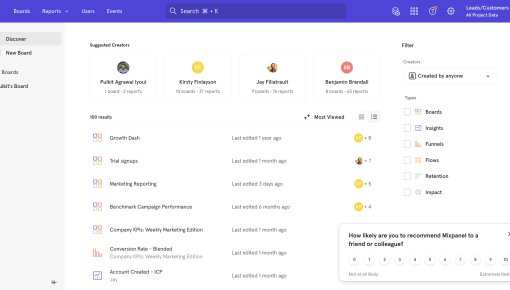
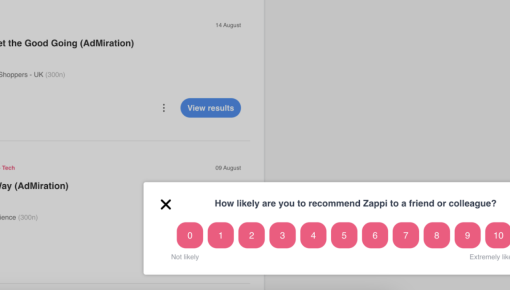
Measure how likely each user is to recommend your app by asking a personalized question and letting them rate their answer from 1 to 10. Quickly gather clear feedback on customer loyalty to help improve your product and user experience.
Understanding how your users feel about your software product is crucial for sustainable growth. While product analytics tell you what users do, Net Promoter Score (NPS) surveys reveal how they feel—and whether they'll stick around or recommend you to others.
An NPS survey template for software provides a standardized way to measure customer loyalty through a simple, personalized question: "[Name], how likely are you to recommend this app?" paired with a 1-10 rating scale. This approach transforms subjective user sentiment into actionable data that product teams can use to drive retention, reduce churn, and identify growth opportunities.
For product managers and growth teams, implementing NPS surveys isn't just about collecting feedback—it's about creating a systematic approach to understanding user satisfaction at scale. The right template ensures consistency across measurements while providing the flexibility to adapt to your specific product context and user journey.
An NPS survey template for software is a pre-structured format that measures user loyalty using the Net Promoter Score methodology, specifically designed for digital product environments. Unlike generic customer satisfaction surveys, software NPS templates focus on the likelihood of recommendation within the context of product usage and feature adoption.
The core components include a personalized question leveraging user data (like names or account information), a standardized 1-10 rating scale, and optional follow-up questions for qualitative insights. This template approach ensures consistent measurement across different user segments, time periods, and product iterations.
What sets software NPS surveys apart from traditional customer surveys is their integration with user behavior data. Instead of sending surveys via email or external forms, effective NPS templates trigger based on specific in-app actions, user milestones, or engagement patterns. This contextual approach significantly improves response rates and data quality.
The benefits extend beyond simple score collection. A well-designed NPS survey template enables benchmarking against industry standards, tracking loyalty trends over time, and identifying specific user segments that drive growth or present retention risks. Personalization tokens—like incorporating the user's name or recent feature usage—can increase engagement rates by up to 40% compared to generic survey approaches.
For SaaS companies, this template becomes a critical component of product-led growth strategies, providing early warning signals for churn risk while identifying satisfied users who can become advocates and referral sources.
Creating an effective NPS survey template requires strategic planning around timing, targeting, and technical implementation. Here's how to build a template that generates meaningful insights without disrupting user experience.
Start by configuring personalization elements that make your survey feel native to your product experience. Set up dynamic name tokens that pull from your user database, ensuring the question reads naturally: "Hi [FirstName], how likely are you to recommend [ProductName] to a colleague?"
Design your 1-10 rating interface with clear visual hierarchy. Use buttons or clickable elements rather than dropdown menus to reduce friction. Consider adding descriptive labels like "Not at all likely" (1-2) and "Extremely likely" (9-10) to provide context for your rating scale.
Timing is everything with in-app NPS surveys. Trigger surveys after positive user experiences—successful feature usage, completed onboarding steps, or achievement of key milestones. Avoid surveying users during error states, immediately after sign-up, or when they're clearly focused on completing specific tasks.
Set frequency limits to prevent survey fatigue. A good rule of thumb is no more than one NPS survey per user every 90 days, with exceptions for major product updates or significant user journey changes.
Implement audience segmentation to ensure relevant targeting. New users (less than 30 days) often provide different insights than power users (daily active for 6+ months). Segment by user type, subscription tier, or feature usage patterns to gather more actionable feedback.
Chameleon's Survey builder streamlines this entire process with no-code survey creation that requires no developer resources. The platform's personalization engine automatically pulls user data for dynamic content, while advanced targeting options let you trigger surveys based on specific user behaviors, page visits, or feature interactions.
Set up trigger conditions based on user properties, session data, or custom events. For example, trigger an NPS survey only for users who've successfully completed your core workflow at least three times, ensuring you're measuring satisfaction among engaged users rather than confused newcomers.
Effective software NPS surveys go beyond the basic template to create meaningful user experiences that generate high-quality feedback.
The most successful NPS surveys appear at moments of user success or satisfaction. Trigger surveys immediately after users complete key workflows, achieve important milestones, or successfully use new features. For example, survey users right after they've exported their first report, completed a successful integration, or reached a usage threshold that indicates product adoption.
Avoid surveying during onboarding flows, error recovery, or when users are clearly task-focused. The goal is capturing sentiment when users have enough context to provide meaningful feedback but aren't distracted by immediate product needs.
Go beyond name tokens to create contextually relevant surveys. Reference specific features the user has engaged with: "Based on your recent use of our analytics dashboard, how likely are you to recommend [Product] to a colleague?" This approach shows you're paying attention to their specific usage patterns and makes the survey feel more relevant.
Always include conditional follow-up questions based on the initial rating. For detractors (0-6), ask "What's the main reason for your score?" For promoters (9-10), ask "What do you love most about [Product]?" These qualitative insights often prove more valuable than the numerical score itself.
Keep surveys visually consistent with your product design to maintain the native experience. Use your brand colors, fonts, and interaction patterns so the survey feels like a natural part of the product rather than an interruption.
Position surveys strategically within your interface—typically as modal overlays or slide-in panels that don't completely block the underlying content. This allows users to dismiss the survey easily if they're not ready to respond.
Create different survey cadences for different user types. Power users can handle more frequent surveys since they have more context and investment in your product. New users should be surveyed less frequently but at more strategic moments in their journey.
Chameleon's advanced targeting capabilities enable sophisticated segmentation based on user properties, behavioral data, and custom events. This ensures your surveys reach the right users at the right moments, maximizing both response rates and data quality while maintaining a seamless user experience.
Collecting NPS scores is only valuable if you can translate the insights into actionable product improvements and strategic decisions.
NPS scores range from -100 to +100, calculated by subtracting the percentage of detractors (0-6) from the percentage of promoters (9-10). For SaaS products, scores above 30 are generally considered good, while scores above 50 indicate excellent customer loyalty.
However, absolute scores matter less than trends over time and segment-specific insights. Track how your NPS changes following product releases, feature launches, or significant user experience updates to understand the impact of your product decisions.
Use promoter feedback to identify your product's strongest value propositions and most successful features. These insights inform marketing messaging, sales conversations, and product positioning strategies.
Detractor feedback reveals friction points, missing features, or user experience issues that drive churn risk. Prioritize addressing detractor concerns that appear frequently across multiple user segments or that align with your strategic product goals.
Establish systematic processes for acting on NPS insights. Route detractor feedback directly to customer success teams for immediate follow-up, while sharing promoter insights with marketing teams to inform case studies and testimonials.
Connect NPS trends to other product metrics like retention rates, feature adoption, and customer lifetime value to understand the broader business impact of user sentiment changes. This integration helps justify product investments and demonstrates the ROI of user experience improvements.
Survey users every 90-120 days maximum to avoid fatigue, with exceptions for major product updates or significant user journey changes. Focus on quality timing over frequency—it's better to survey less often at optimal moments than to survey frequently at random times.
SaaS products typically see NPS scores between 30-50, with scores above 50 considered excellent. However, focus more on trends and improvements over time rather than absolute benchmarks, as scores vary significantly by industry, user type, and product maturity.
Yes, but maintain the core "likelihood to recommend" framework to preserve score validity. You can add context about specific features or timeframes: "Based on your experience with our new dashboard, how likely are you to recommend [Product]?"
Trigger surveys at moments of user success, keep the design consistent with your product interface, and always include personalization elements. Response rates typically improve when surveys feel like a natural part of the product experience rather than an external interruption.
Yes, but thoughtfully. Acknowledge their feedback quickly and provide clear next steps or timelines for addressing their concerns. However, avoid overwhelming detractors with immediate sales or retention outreach—focus first on understanding and resolving their specific issues.
Start a free trial or talk to our team.
