









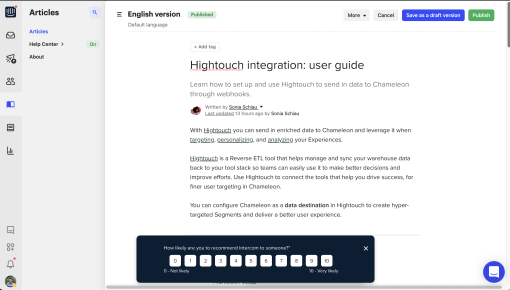
Intercom's NPS Survey
Intercom nails subtlety with this NPS survey. It slides in at the bottom without interrupting your flow,...



Existing customer? Sign in
Measure how satisfied users are with their recent customer support experience by asking them to rate how likely they are to recommend your support service on a scale from 1 to 10, helping you identify areas for improvement and track support team performance.
Companies with superior customer service experience 5.7 times more revenue growth than competitors with weaker support performance. Yet most product teams struggle to measure their support team's impact on user satisfaction and retention. While general product NPS surveys provide broad insights, customer support NPS surveys offer targeted feedback that directly correlates with support team performance and customer success outcomes.
A customer support NPS survey focuses specifically on users' experiences with your support interactions—whether through live chat, help desk tickets, or knowledge base usage. Unlike broad product satisfaction surveys, these targeted surveys capture feedback when support experiences are fresh in users' minds, providing actionable insights for support optimization.
This customer support NPS survey template helps product teams measure support satisfaction through contextual in-app surveys that achieve higher response rates than traditional email surveys. By triggering surveys immediately after support interactions, you'll gather more accurate feedback and identify specific improvement opportunities for your support processes.
A customer support NPS survey measures user satisfaction specifically with support interactions using the standard Net Promoter Score methodology. Users rate their likelihood to recommend your support experience on a 0-10 scale, with responses categorized as detractors (0-6), passives (7-8), or promoters (9-10).
The key distinction between general product NPS and customer support NPS lies in timing and context. While product NPS surveys measure overall satisfaction with your entire product experience, support NPS surveys focus exclusively on recent support interactions. This targeted approach provides more actionable feedback for support team improvements and helps identify specific pain points in your support workflow.
Customer support NPS surveys deliver several critical benefits for product teams. They provide direct correlation between support quality and customer retention, enable performance tracking for individual support agents or channels, and identify specific support process improvements. Most importantly, they help product teams understand how support experiences impact overall product adoption and user engagement.
Chameleon's contextual triggering capabilities make customer support NPS surveys particularly effective. Instead of sending generic email surveys days after support interactions, you can trigger in-app surveys immediately after users have an interaction with support. This contextual approach captures feedback when experiences are most memorable and actionable.
Creating effective customer support NPS surveys requires strategic setup and targeting to capture meaningful feedback from the right users at optimal moments.
Setup and Configuration Start by applying the customer support NPS survey template in Chameleon's survey builder. The template includes pre-configured NPS scoring logic and response categorization, saving setup time while ensuring accurate data collection. Customize the survey design to match your brand colors and typography for seamless integration with your product experience.
User Targeting and Segmentation Identify users who've recently interacted with your support team through multiple channels. Target users who've submitted support tickets within the past 24-48 hours, engaged with live chat sessions, or spent significant time in your help center. Chameleon's advanced targeting options allow you to segment by any user property or event that you send to Chameleon for more granular insights.
Optimal Timing Strategy Trigger surveys immediately after support interactions conclude for maximum relevance and response rates. Set up automated triggers for users who close help center articles, end chat sessions, or receive support ticket resolution notifications. Avoid surveying users during active support interactions, as this can interrupt their problem-solving process and skew responses negatively.
Survey Customization Options Adapt the standard NPS question to reflect your support terminology and brand voice. Instead of generic wording, use phrases like "How likely are you to recommend our support team to a colleague?" or "Based on your recent support experience, how likely are you to recommend [Product Name] support?" This customization makes surveys feel more personal and relevant to users' specific experiences.
Follow-up Logic and Response Handling Configure conditional logic to provide different follow-up experiences based on NPS scores. Promoters (9-10) can receive thank-you messages and requests for public reviews or testimonials. Passives (7-8) benefit from brief follow-up questions about specific improvement areas. Detractors (0-6) should receive immediate escalation to support managers with opportunities to provide detailed feedback about their negative experiences.
Chameleon's real-time response tracking enables immediate action on detractor feedback.
Implementing customer support NPS surveys effectively requires attention to timing, customization, and response optimization strategies that maximize both participation and actionable insights.
Timing Optimization Strategies Survey users within 24-48 hours of support interactions while experiences remain fresh and memorable. Avoid immediate post-interaction surveys that might interrupt users still processing solutions or implementing fixes. Instead, allow brief cooling-off periods that let users evaluate whether support interactions actually resolved their issues.
Question Customization and Clarity Adapt survey language to match your support team's terminology and communication style. If your support team uses specific phrases or maintains particular brand voice characteristics, incorporate these elements into survey questions for consistency. Clear, specific wording like "How satisfied were you with the response time from our support team?" provides more actionable feedback than generic satisfaction questions.
Response Rate Optimization Techniques Keep surveys concise with single-question NPS scoring plus optional follow-up questions for additional context. Design mobile-friendly interfaces that work seamlessly across devices, though focus primarily on desktop experiences where most support interactions occur. Use progressive disclosure to show follow-up questions only when users provide initial NPS scores, reducing perceived survey length.
Strategic Follow-up Approaches Develop differentiated response strategies for each NPS category. Promoters appreciate recognition and opportunities to share positive experiences publicly. Passives respond well to specific improvement questions that help identify enhancement opportunities. Detractors require immediate attention with direct escalation paths to support managers and detailed feedback collection about negative experiences.
Data Analysis and Trend Tracking Track NPS trends over time to identify seasonal patterns, support team performance changes, and correlation with product updates or support process modifications. Segment results by support channel, agent performance, ticket type, and user characteristics to identify specific improvement opportunities and successful practices worth scaling.
Chameleon's behavioral targeting based on user actions ensures surveys reach users most likely to provide valuable feedback, while seamless integration with existing product workflows maintains natural user experiences without interrupting core product usage.
When should I send a customer support NPS survey? Send customer support NPS surveys 24-48 hours after support interactions conclude, allowing users time to implement solutions and evaluate effectiveness.
What's a good NPS score for customer support? Customer support NPS scores typically range from 30-50 for good performance, with scores above 50 considered excellent. Industry benchmarks vary, but focus on improving your baseline score over time rather than comparing to external standards.
How do I increase customer support NPS survey response rates? Optimize response rates through contextual in-app surveys, concise single-question formats, and clear value propositions about feedback usage. Chameleon's behavioral targeting ensures surveys reach engaged users most likely to respond.
Can I customize the NPS survey questions? Yes, customize both primary NPS questions and follow-up inquiries to match your brand voice and support terminology. Chameleon's survey builder enables complete question customization while maintaining proper NPS scoring methodology.
How often should I survey customers about support? Survey customers after each significant support interaction, but avoid over-surveying individual users. Implement frequency caps to prevent survey fatigue while ensuring comprehensive feedback collection across your user base.
What should I do with NPS survey feedback? Act immediately on detractor feedback through direct escalation, analyze trends for process improvements, and recognize high-performing support team members.
Successful customer support NPS programs extend beyond individual surveys to create comprehensive feedback systems that drive continuous support improvement and customer success outcomes.
Integrate support NPS data with customer success workflows to identify at-risk accounts and proactive intervention opportunities. Users providing low support NPS scores often signal broader product adoption challenges that customer success teams can address through targeted outreach and additional training resources.
Use NPS feedback for support team coaching and performance development. Individual agent performance trends help identify training needs, successful practices worth sharing, and recognition opportunities for high-performing team members. Aggregate data reveals process improvements and resource allocation opportunities across your entire support organization.
Connect support NPS scores to overall customer health metrics for comprehensive user experience tracking. Customers with consistently positive support experiences typically demonstrate higher product adoption rates, longer retention periods, and increased expansion revenue potential.
Scale survey programs across multiple products or teams by standardizing question formats while customizing targeting criteria for different user segments. Chameleon's template system enables consistent survey experiences while maintaining flexibility for specific team requirements and product characteristics.
This customer support NPS survey template provides the foundation for data-driven support optimization that directly impacts customer satisfaction and business outcomes. Try this template in Chameleon to start measuring support team performance and identifying improvement opportunities that drive customer success.
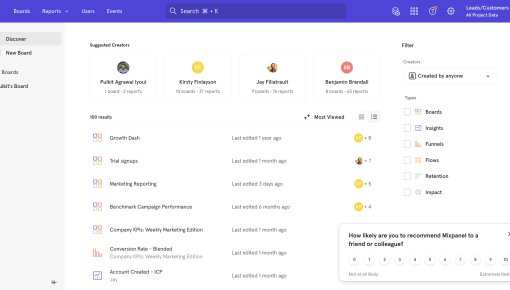
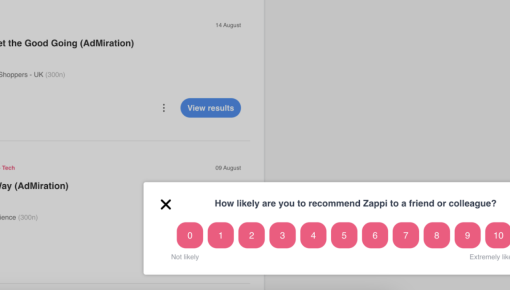
Start a free trial or talk to our team.
