









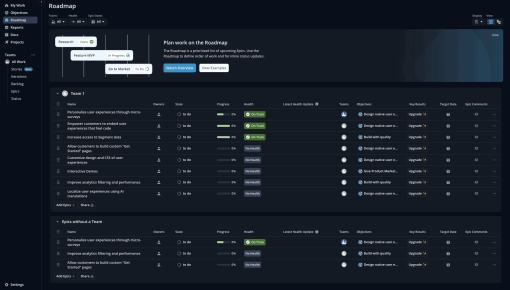
Shortcut's Embedddable Card
Shortcut uses an Embeddable Card to nudge new users to discover their "Roadmaps" feature. The team uses a...



Existing customer? Sign in
Promote upcoming webinars directly to users inside your product and encourage them to register by showing a clear message and a "Register now" button at the right moment. Drive more event signups by reaching users when they are most engaged.
Product teams at SaaS companies face a constant challenge: how do you effectively promote educational webinars to users who are already engaged with your product? The answer lies in webinar registration banners—targeted in-app notifications that appear at the right moment to drive event signups and boost user engagement.
Unlike generic email blasts that often get lost in crowded inboxes, webinar registration banners reach users when they're actively using your product. This contextual approach leads to higher conversion rates and helps product teams build stronger relationships with their user base. When implemented strategically, these banners become powerful tools for driving product adoption, showcasing expertise, and supporting user success initiatives.
Chameleon makes it simple for product teams to create, target, and optimize webinar registration banners without requiring engineering resources. Let's explore how to leverage this approach to maximize your webinar attendance and user engagement.
A webinar registration banner is an in-app notification that promotes educational webinars directly to users while they're engaged with your SaaS product. These banners typically appear as overlay alerts, slide-in notifications, or embedded messages within your product interface, designed to capture attention without disrupting the core user experience.
These banners are particularly effective for promoting various types of webinars, including feature deep-dives, onboarding masterclasses, industry best practices sessions, and customer success stories. Unlike email campaigns that compete with dozens of other messages, in-app webinar promotion reaches users in their natural workflow, creating a more contextual and relevant experience.
The key difference between webinar registration banners and traditional email promotion lies in timing and targeting precision. While emails are sent to broad lists at predetermined times, in-app banners can be triggered by specific user behaviors, product usage patterns, or engagement levels. This behavioral targeting ensures that users see webinar promotions when they're most likely to be interested and available to attend.
Visually, effective webinar registration banners include clear value propositions, compelling headlines, registration CTAs, and often feature speaker information or session previews. They maintain brand consistency with your product design while standing out enough to capture user attention.
Chameleon's features enable sophisticated targeting capabilities, allowing product teams to display webinar banners based on user segments, behavioral triggers, or specific product interactions. This level of precision targeting significantly improves conversion rates compared to one-size-fits-all approaches.
Creating effective webinar registration banners requires strategic planning, thoughtful implementation, and continuous optimization. Here's a comprehensive approach to building banners that drive results.
Start by identifying your target user segments for webinar promotion. Consider factors like user role, product usage patterns, feature adoption levels, and engagement history. For example, you might promote advanced feature webinars to power users while targeting onboarding sessions to newer users who haven't fully adopted core features.
Timing considerations are crucial for banner effectiveness. Analyze when your target users are most active in your product and likely to engage with promotional content. Consider the webinar schedule, registration deadlines, and user time zones when planning banner display timing.
Develop a content strategy that focuses on clear value propositions. Your banner messaging should immediately communicate what users will learn, why it matters to them, and how it will help them succeed with your product.
Choose optimal placement within your product interface where banners will be visible without disrupting critical workflows. Common effective locations include dashboard headers, navigation areas, or contextual placements related to the webinar topic.
Craft compelling banner copy that emphasizes benefits over features. Use action-oriented language and create gentle urgency around registration deadlines. Your CTA buttons should be clear and specific—"Reserve My Spot" often performs better than generic "Learn More" buttons.
Set up comprehensive tracking and measurement from the start. Track not just click-through rates, but also registration completions, actual webinar attendance, and post-webinar engagement with your product.
Leverage Chameleon's advanced targeting capabilities to reach the most relevant user segments. Use behavioral triggers such as feature usage patterns, time spent in specific product areas, or completion of certain actions to display banners at optimal moments.
Integrate webinar promotion banners with existing user onboarding flows. For example, show advanced training webinar banners to users who have completed basic onboarding steps, creating a natural progression in their product education journey.
Utilize Chameleon's A/B testing functionality to experiment with different embedded banner variations. Test different headlines, CTA copy, visual designs, and placement options to optimize conversion rates continuously.
Ensure banners enhance rather than disrupt the core product experience. Use Chameleon's Rate Limiting to prevent banner fatigue and maintain positive user experience. Consider the visual hierarchy and ensure banners complement your existing product design.
Optimizing webinar registration banners requires attention to content, targeting, design, and measurement strategies.
Write benefit-focused copy that clearly communicates the value users will receive from attending the webinar. Instead of "Product Update Webinar," try "Master New Features That Save 2 Hours Per Week." This approach immediately shows users what's in it for them.
Create appropriate urgency without being pushy. Phrases like "Limited seats available" or "Register by Friday" work better than aggressive countdown timers that might feel manipulative.
Personalize messages based on user behavior or role when possible. Chameleon's targeting capabilities allow you to show different banner variations to different user segments, increasing relevance and conversion rates.
Optimize CTA button text and design for maximum impact. Use action-oriented language that creates excitement about the learning opportunity. "Secure My Spot" or "Join the Session" often outperform generic alternatives.
Segment users based on product usage patterns to ensure webinar relevance. Show feature-specific webinar banners only to users who have engaged with related product areas or expressed interest through their behavior.
Time banner displays for maximum impact by analyzing user activity patterns. Display banners when users are most engaged and likely to take action, avoiding times when they're focused on critical tasks.
Implement frequency capping to avoid banner fatigue. Show banners enough times to ensure visibility without becoming annoying. Chameleon's Rate Limiting controls help maintain the right balance.
Exclude users who have already registered to prevent redundant messaging and improve user experience. This targeting refinement also helps focus your promotion efforts on users who still need to take action.
Create clear visual hierarchy with attention-grabbing elements that don't overwhelm the user interface. Use contrasting colors for CTA buttons while maintaining brand consistency with your product design.
Ensure accessibility by following web accessibility guidelines for color contrast, text size, and keyboard navigation. This approach expands your potential audience and demonstrates inclusive design practices.
Optimize banner sizing and placement for different screen configurations while maintaining visual impact. Test various sizes and positions to find the sweet spot between visibility and user experience.
Track key metrics including click-through rates, registration conversion rates, and actual webinar attendance. This comprehensive measurement approach helps you understand the full funnel from banner impression to event participation.
Set up proper attribution to understand which banner variations and targeting strategies drive the highest-quality registrations. Connect webinar attendance data back to banner performance for complete insights.
Iterate based on performance data by regularly reviewing metrics and testing new approaches. Use Chameleon's analytics dashboard to identify trends and optimization opportunities.
Webinar registration banners excel in various scenarios across different types of SaaS companies. New feature announcement webinars benefit from targeted promotion to users who would most benefit from the updates, using behavioral data to identify the right audience.
Industry best practices sessions work well when promoted to users who have reached certain usage milestones or demonstrated interest in optimization. Customer success stories and case study webinars can be targeted to users in similar industries or use cases.
Product onboarding masterclasses are particularly effective when promoted to users who have completed initial setup but haven't fully adopted advanced features. Advanced user training sessions can be targeted to power users who are ready for deeper product education.
Chameleon's sophisticated segmentation capabilities allow for highly targeted webinar promotion, ensuring that each user sees only the most relevant educational opportunities. This precision targeting improves both user experience and conversion rates.
How do I measure webinar registration banner effectiveness? Track click-through rates, registration conversions, actual attendance rates, and post-webinar product engagement. Use Chameleon's analytics and integrations to connect banner performance to business outcomes.
What's the best placement for webinar registration banners? Optimal placement depends on your product interface, but dashboard headers, navigation areas, and contextual locations related to webinar topics typically perform well. Test different positions to find what works best for your users.
How often should I promote webinars to the same users? Use frequency capping to show banners 2-3 times over several days, then pause to avoid fatigue. Chameleon's Rate Limiting controls help maintain optimal exposure without overwhelming users.
Can I customize webinar banners for different user segments? Yes, Chameleon's targeting capabilities allow you to create different banner variations for different user segments, personalizing messaging based on role, usage patterns, or engagement levels.
What makes a webinar registration banner convert well? Clear value propositions, benefit-focused copy, appropriate urgency, strong CTAs, and precise targeting to relevant user segments. The combination of compelling content and smart targeting drives the highest conversion rates.
How do I integrate webinar registration with my existing tech stack? Chameleon integrates with popular webinar platforms and marketing tools, including Livestorm, allowing seamless data flow between banner clicks, registrations, and attendance tracking. This integration enables comprehensive campaign measurement and optimization.
Ready to boost your webinar attendance with targeted in-app promotion? Chameleon's webinar registration banner template provides everything you need to create, target, and optimize effective campaigns that drive real results for your product team.

Start a free trial or talk to our team.
