









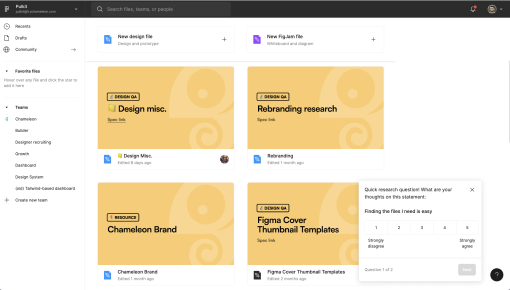
Figma's Microsurvey
Figma’s microsurvey is a quick, thoughtful touch to gather feedback on file navigation. The first question...



Existing customer? Sign in
Quickly measure how easily users can find information on a specific page by letting them rate their experience on a simple 1-5 scale.
Product teams that collect continuous user experience feedback see 23% higher user retention rates compared to those that don't. Yet many product managers struggle with implementing effective feedback collection systems that actually drive product improvements. User experience feedback rating surveys offer a streamlined solution for gathering actionable insights about how users interact with your product.
A user experience feedback survey uses simple numerical ratings—typically on a 1-5 scale—to measure specific aspects of the user journey. Unlike lengthy questionnaires or complex research studies, these surveys capture quick, quantifiable feedback that product teams can immediately analyze and act upon. The most effective UX feedback surveys focus on specific user actions, like "How easy is it to find what you're looking for on this page?" rather than broad satisfaction questions.
This approach transforms subjective user experiences into measurable data points that inform product decisions, identify friction points, and validate feature improvements. When implemented strategically, user experience feedback rating surveys become a powerful tool for continuous product optimization and enhanced user adoption.
A user experience feedback rating survey is a targeted feedback collection method that uses numerical scales to measure specific aspects of user interaction with your product. These surveys typically employ a 1-5 rating system where users quickly evaluate their experience with particular features, pages, or workflows.
The key differentiator from other feedback methods lies in their specificity and timing. While Net Promoter Score (NPS) surveys measure overall loyalty and Customer Satisfaction (CSAT) surveys assess general satisfaction, UX feedback rating surveys focus on granular user experience elements. They capture feedback at precise moments in the user journey when experiences are fresh and actionable.
These surveys excel in several deployment scenarios: - In-app moments: Triggered after users complete specific actions or reach certain pages - Feature interactions: Deployed when users engage with new functionality - Navigation assessments: Measuring findability and ease of use across different product areas - Onboarding checkpoints: Evaluating user experience during critical adoption moments
The 1-5 numerical rating system provides several advantages for product teams. It generates quantifiable data that's easy to track over time, enables statistical analysis for identifying trends, and allows for quick user responses that don't interrupt workflow. Unlike open-ended feedback that requires manual analysis, rating surveys provide immediate insights that product teams can incorporate into sprint planning and feature development cycles.
For product teams focused on user experience measurement, these surveys bridge the gap between user behavior analytics and qualitative feedback, offering a middle ground that's both scalable and actionable.
Creating effective user experience feedback rating surveys requires strategic planning around question design, timing, and deployment methods. The most successful implementations follow a structured approach that maximizes response rates while generating actionable insights.
Step 1: Design Focused Questions Start with specific, actionable questions that tie directly to user experience goals. Instead of asking "How satisfied are you with this feature?" ask "How easy was it to complete this task?" or "How easy is it to find what you're looking for on this page?" These targeted questions provide clearer direction for product improvements.
Step 2: Choose Optimal Timing Deploy surveys immediately after users complete relevant actions. For navigation feedback, trigger surveys when users spend significant time on a page or use search functionality. For feature feedback, launch surveys after users interact with new functionality or complete key workflows.
Step 3: Implement Strategic Triggers Set up surveys based on user behavior rather than arbitrary timing. Effective triggers include: - Page exit intent for navigation feedback - Task completion for workflow assessment - Feature interaction for functionality evaluation - Time-based triggers for engagement measurement
Step 4: Streamline Response Collection Keep surveys short and visually clear. Use prominent rating scales with clear labels (1 = Very Difficult, 5 = Very Easy) and ensure surveys don't disrupt user workflow. Mobile-responsive design ensures consistent experience across devices.
Chameleon Surveys enable seamless in-app feedback collection with advanced targeting capabilities that ensure surveys reach the right users at optimal moments. The platform's real-time response tracking provides immediate visibility into user feedback trends, while integration with existing product analytics tools creates a comprehensive view of user experience data.
Step 5: Establish Analysis Workflows Create systematic processes for reviewing feedback data, identifying patterns, and translating insights into product improvements. Set up automated alerts for significant rating changes and establish regular review cycles with cross-functional teams.
Successful user experience feedback collection requires strategic implementation that balances user experience with data quality. Product teams that follow proven best practices see higher response rates and more actionable insights from their feedback programs.
Optimize Survey Frequency and Timing Avoid survey fatigue by implementing smart frequency controls. Limit individual users to one survey per session and space repeated surveys at least 7-14 days apart. Deploy surveys during natural workflow pauses rather than interrupting active tasks. The most effective timing occurs immediately after task completion when user experience is fresh but workflow isn't disrupted.
Craft Questions That Drive Action Focus on specific, measurable aspects of user experience rather than general satisfaction. Questions like "How easy was it to find the information you needed?" provide clearer direction for product improvements than "How do you feel about this page?" Use consistent rating scales across all surveys to enable meaningful comparison and trend analysis.
Maximize Response Rates Keep surveys short—ideally one primary question with an optional follow-up. Use clear, conversational language that matches your product's tone. Provide context about why feedback matters and how it will be used. Consider offering small incentives for completion, but ensure they don't bias responses.
Convert Feedback into Product Improvements Establish clear processes for translating survey data into actionable product changes. Set up regular review cycles where product, design, and development teams analyze feedback trends together. Create feedback loops that show users how their input influenced product improvements, encouraging continued participation.
Chameleon's advanced targeting and segmentation features enable product teams to customize surveys for different user segments, ensuring relevant questions reach appropriate audiences. The platform's integration with product analytics tools provides context around survey responses, helping teams understand the relationship between user behavior and feedback scores. Automated follow-up capabilities allow teams to gather additional context from users who provide concerning ratings.
Collaborate Across Functions Share survey insights with design teams for user experience improvements, development teams for technical optimizations, and customer success teams for user support enhancements. Regular cross-functional feedback reviews ensure insights reach all stakeholders who can act on user experience data.
User experience feedback rating surveys prove most valuable in specific scenarios where quick, quantifiable insights can drive immediate product improvements. Understanding when to deploy these surveys maximizes their impact on product adoption and user satisfaction.
Post-Feature Launch Feedback Collection Deploy rating surveys immediately after releasing new features to gauge user reception and identify friction points. Focus on specific aspects like ease of discovery, clarity of functionality, and integration with existing workflows. This feedback helps product teams quickly iterate on new releases and address adoption barriers.
Onboarding Experience Optimization Use surveys at key onboarding checkpoints to measure user experience during critical adoption moments. Questions about task completion ease and information findability help identify where new users struggle most. This data directly informs onboarding flow improvements that can significantly impact user activation rates.
Navigation and Findability Assessment Implement surveys on high-traffic pages or after users interact with navigation elements to understand how easily users locate information and complete tasks. These insights guide information architecture improvements and interface design decisions that enhance overall product usability.
Product Adoption Barrier Identification Deploy surveys when users abandon key workflows or spend excessive time on specific tasks. Rating-based feedback helps quantify friction levels and prioritize which user experience improvements will have the greatest impact on product adoption metrics.
Continuous User Experience Monitoring Establish ongoing feedback collection for critical user journeys to track experience quality over time. Regular monitoring helps product teams identify gradual degradation in user experience and measure the impact of product changes on user satisfaction.
The key to successful implementation lies in connecting survey deployment to specific product goals and user journey moments where feedback can drive meaningful improvements.
How often should product teams collect UX feedback? Product teams should collect UX feedback continuously but strategically. Implement surveys at key user journey moments rather than on fixed schedules. Limit individual users to one survey per session and space repeated surveys 7-14 days apart to avoid fatigue while maintaining consistent data flow.
What's the ideal response rate for user experience surveys? Effective UX feedback surveys typically achieve 15-25% response rates when properly targeted and timed. Focus on survey quality and relevance rather than maximizing response volume. Higher engagement from targeted user segments provides more actionable insights than broad, low-engagement collection.
How do you analyze 1-5 rating scale feedback? Track average ratings over time to identify trends and benchmark performance. Segment responses by user characteristics, feature usage, or journey stage to uncover specific improvement opportunities. Focus on rating distribution patterns—high numbers of 1-2 ratings indicate critical issues requiring immediate attention.
Can UX feedback surveys improve product adoption? Yes, when feedback drives targeted product improvements. Surveys that identify specific friction points enable teams to address adoption barriers systematically. The key lies in establishing clear processes for translating feedback into product changes and measuring the impact of those improvements on adoption metrics.
What survey questions work best for product teams? The most effective questions focus on specific user experience aspects: task completion ease, information findability, feature clarity, and workflow efficiency. Avoid general satisfaction questions in favor of actionable queries like "How easy was it to complete this task?" or "How clear were the instructions provided?"
How do you customize feedback surveys for different user segments? Tailor survey questions to specific user roles, experience levels, and usage patterns. New users benefit from onboarding-focused questions, while power users provide valuable feedback on advanced functionality. Use behavioral data to trigger relevant surveys based on actual user actions and engagement patterns.
Chameleon's targeting capabilities enable sophisticated survey customization based on user attributes, behavior patterns, and product usage data, ensuring each user receives relevant feedback requests that generate actionable insights for product improvement.
Start a free trial or talk to our team.
