









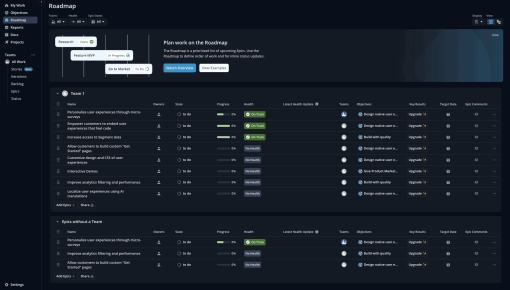
Shortcut's Embedddable Card
Shortcut uses an Embeddable Card to nudge new users to discover their "Roadmaps" feature. The team uses a...



Existing customer? Sign in
Announce new product features directly inside your app to quickly inform users, highlight key benefits, and encourage immediate engagement or let them choose to explore later. Drive feature adoption by capturing user attention at the right moment with clear messaging and easy next steps.
You've built an amazing new feature, but if users don't know about it, it might as well not exist. This is the harsh reality facing product teams everywhere—despite investing months in development, many features go unnoticed and underutilized simply because users aren't aware they exist.
Feature announcements play a critical role in product adoption, serving as the bridge between development and actual user engagement. While email notifications often get buried in crowded inboxes and external communications lack context, in-app modals deliver timely, relevant messages exactly when users are engaged with your product.
Our new feature announcement modal template provides everything you need to create compelling, conversion-focused announcements that drive real adoption. With Chameleon's intuitive modal builder, you can customize messaging, target specific user segments, and track performance—all without requiring developer resources or complex implementation.
A new feature announcement modal is a targeted in-app notification that appears as an overlay within your product interface to inform users about recently launched features or capabilities. Unlike passive notifications or external communications, these modals capture user attention at the optimal moment—when they're already engaged and using your product.
Feature announcement modals differ from other in-app messaging types in their specific purpose and timing. While onboarding tours guide new users through existing functionality and tooltips provide contextual help, announcement modals focus exclusively on introducing something new to your existing user base.
The most effective announcement modals include several key components: a compelling headline that creates excitement, a value-focused subheading that explains the benefit, clear call-to-action buttons that guide next steps, and strategic visual elements that support the message without overwhelming the interface.
The psychology behind successful feature announcements centers on three principles: urgency (users want to stay current), value proposition (clear benefits), and clear next steps (removing friction from exploration). When users understand both what's new and why it matters to them, they're significantly more likely to engage.
Chameleon's modal builder streamlines this entire process, offering pre-built templates that incorporate these psychological principles while allowing complete customization to match your brand and messaging needs. The platform's template gallery includes proven layouts optimized for different announcement types, from major feature launches to incremental improvements.
Creating effective feature announcement modals with Chameleon follows a straightforward five-step process that transforms your feature launch from development completion to user adoption.
Setup in Chameleon begins by accessing your template gallery within the Chameleon dashboard. Navigate to the "Templates" section under “Styling” and select the "New Feature Announcement Modal" from the available options. This template provides a proven structure while maintaining flexibility for your specific needs.
Customization focuses on three critical elements that determine your modal's effectiveness. Start with crafting compelling headlines that generate excitement—for example, "Just launched: Bulk Actions 🚀" immediately communicates both novelty and capability. Your subheading should focus on user value rather than technical specifications, explaining how this feature solves existing pain points or improves workflows. Design your call-to-action buttons strategically, offering both immediate engagement ("Try it Now") and deferred exploration ("Later") to accommodate different user preferences and contexts.
Targeting leverages Chameleon's advanced segmentation capabilities to ensure your announcement reaches the right users at the optimal time. Set up audience segments based on user behavior, feature access levels, or account characteristics. Configure timing triggers that align with natural user workflows—perhaps showing the modal after login for power users or during specific task completion for casual users.
Testing involves A/B testing different versions of your modal to optimize performance before full deployment. Test headline variations, CTA button copy, timing triggers, and visual elements to identify the combination that drives highest engagement and feature adoption rates.
Launch and monitoring complete the process through Chameleon's deployment tools and real-time analytics dashboard. To measure success and identify optimization opportunities, monitor engagement rates, click-through rates, and connect with your product analytics tool to measure subsequent feature usage.
The platform's integration capabilities ensure your announcement modals work seamlessly with existing product workflows, while built-in measurement tools automatically track user interactions and progression through your intended funnel.
Successful feature announcement modals require strategic thinking about timing, messaging, design, and follow-up to maximize both user experience and adoption rates.
Timing determines whether your announcement enhances or interrupts the user experience. Show announcements immediately after login for features that impact the entire workflow, or trigger them during relevant task completion when the new capability directly relates to what users are already doing. Avoid interrupting critical workflows or appearing during high-stress moments in your product usage.
Messaging should always prioritize user benefits over feature specifications. Instead of explaining how something works, focus on what users can accomplish and how their experience improves. Use concrete language that connects new capabilities to existing pain points or desired outcomes.
Design considerations include visual hierarchy that guides attention naturally, strategic button placement that supports user decision-making, and clear dismissal options that respect user autonomy. Maintain consistency with your product's existing design language while ensuring the modal stands out enough to capture attention.
Frequency management prevents notification fatigue by spacing announcements appropriately and avoiding overwhelming users with too many new features simultaneously. Consider user segments when determining frequency—power users might appreciate more frequent updates while casual users prefer fewer, more significant announcements.
Personalization tailors messages to specific user segments based on their usage patterns, account type, or demonstrated interests. Advanced users might appreciate technical details while beginners need more context and guidance.
Follow-up connects announcements to guided tours or tutorials that help users successfully adopt new features.
Common mistakes include overwhelming users with too much information, poor timing that interrupts critical workflows, weak value propositions that don't clearly communicate benefits, and missing or unclear CTAs that leave users uncertain about next steps.
Chameleon's advanced targeting capabilities, built-in analytics and optimization tools, and seamless integration with Tours for post-announcement guidance address these challenges while providing the flexibility needed for different feature types and user segments.
Effective measurement focuses on metrics that connect announcement engagement to actual feature adoption and business outcomes.
Key metrics include modal engagement rates (clicks vs. impressions), feature adoption rates post-announcement, user progression to secondary actions within the new feature, and dismissal vs. engagement patterns that reveal user sentiment and timing effectiveness.
Optimization strategies leverage A/B testing for headline variations, timing experiments to identify optimal trigger moments, CTA button optimization for maximum conversion, and follow-up sequence testing to improve the complete user journey from announcement to feature mastery.
Chameleon's analytics dashboard and integrations with analytics tools provide real-time visibility into these metrics.
How often should I announce new features to users? Balance depends on your release cadence and user segments. Monthly announcements work well for most SaaS products, but adjust based on feature significance and user feedback.
What's the best time to show feature announcement modals? Immediately after login for workflow-impacting features, or during relevant task completion when the new capability directly relates to current user activities.
How do I customize the announcement modal template in Chameleon? Access your Chameleon dashboard, navigate to Templates (under Styling), select the announcement modal, and use the visual editor to modify headlines, subheadings, CTAs, and styling to match your brand.
Should I include screenshots in feature announcement modals? Use screenshots sparingly and only when they clearly illustrate the value proposition. Too many visuals can overwhelm the message and slow loading times.
How do I measure the success of feature announcements? Track modal engagement rates, subsequent feature usage, and user progression through your intended adoption funnel using Chameleon's built-in analytics and integrations with product analytics tools like Mixpanel, Heap, and Amplitude.
Can I target specific user segments with feature announcements? Yes, Chameleon's advanced targeting allows segmentation based on user behavior, account characteristics, feature access levels, and custom attributes.
What's the difference between announcement modals and product tours? Announcement modals create awareness and initial interest, while product tours provide hands-on guidance for feature adoption. They work best when used together in sequence.
Ready to transform your feature launches from overlooked updates to adoption drivers? Try Chameleon's new feature announcement modal template and start creating announcements that users actually engage with and act upon.
Start a free trial or talk to our team.
