









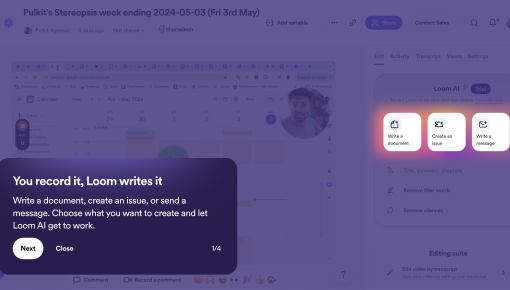
Loom's AI Onboarding Tour
The Loom AI tour is a seamless and engaging introduction to the platform's capabilities. With each step, it...



Existing customer? Sign in
Greet new users in a friendly, non-intrusive way and guide them to start exploring your product, while giving them the option to continue on their own without interruption.
Product teams face a constant dilemma: how do you guide new users without overwhelming them? Traditional pop-ups and aggressive modals often create more friction than they solve, leading to higher abandonment rates and frustrated users who feel interrupted rather than helped.
Subtle welcome messages offer a better approach. These non-intrusive onboarding elements provide gentle guidance without hijacking the user experience. Unlike full-screen overlays that demand immediate attention, subtle welcome messages respect user autonomy while still delivering essential information. The result? Higher completion rates, improved user satisfaction, and reduced onboarding abandonment.
This template represents the sweet spot between helpful guidance and respectful user experience—a solution that acknowledges users' intelligence while providing the support they need to succeed.
A subtle welcome message is a non-intrusive onboarding element that appears unobtrusively on screen, typically positioned in a corner or edge area without blocking the main interface. Unlike aggressive modals that dim the background and force user interaction, subtle welcome messages maintain a small footprint and allow users to continue exploring while the message remains available.
Key characteristics include: - No lightbox or background dimming that interrupts the natural flow - Corner or edge positioning that doesn't obstruct primary interface elements - Optional interaction with clear dismissal options like "Maybe later" - Contextual timing that appears when users can benefit most from guidance
The psychology behind subtle approaches is rooted in user autonomy theory. When people feel pressured or interrupted, they often react negatively—even to helpful information. Subtle welcome messages work because they respect the user's current focus while making assistance readily available when needed.
This approach works particularly well for: - First-time users exploring a new interface - Feature discovery moments when users encounter new capabilities - Re-engagement scenarios for returning users - Complex products where gentle guidance prevents overwhelm
This subtle welcome message template consists of three core components designed for maximum effectiveness with minimal intrusion.
Personalized Heading: The template opens with "Welcome, [NAME]!" using dynamic personalization to create immediate connection. This personal touch transforms a generic message into a tailored experience that feels specifically crafted for each user.
Supportive Subheading: Below the greeting, a brief explanatory line like "Let's get you started with a quick tour" sets clear expectations about what comes next. This subheading balances enthusiasm with practicality, avoiding overwhelming language while communicating value.
Dual Call-to-Action Structure: The template includes both a primary action ("Start tour") and a secondary option ("Maybe later"). This dual approach is crucial—it removes pressure by giving users control over their experience. The "Maybe later" option acknowledges that timing matters and users might prefer to explore independently first.
Strategic Positioning: The template appears in the top-right corner, a location that's visible but non-blocking. This positioning follows established UI patterns where users expect to find notifications and optional information, making the message feel natural rather than intrusive.
Chameleon's template system allows extensive customization of colors, copy, timing, and positioning while maintaining the core subtle approach that makes this pattern effective.
Successful implementation starts before you ever create the message itself. Begin with audience segmentation—identify which users will see this message and when they'll encounter it. New users on their first login represent the primary audience, but consider secondary scenarios like feature launches or product updates.
Setup Process in Chameleon: 1. Create your audience segment using Chameleon's targeting capabilities to identify first-time users or specific user cohorts 2. Configure the trigger event such as first page load, specific feature access, or time-based delays 3. Customize the template with your brand colors, personalized copy, and appropriate CTAs 4. Set positioning rules to ensure the message appears exactly where you want it to 5. Define completion criteria so users don't see the message repeatedly after taking action
Personalization Best Practices: Beyond the [NAME] variable, consider role-based customization. A marketing manager might see "Welcome, [NAME]! Ready to explore campaign analytics?" while a developer sees "Welcome, [NAME]! Let's dive into API documentation." This level of personalization increases relevance and engagement.
A/B Testing Setup: Test different approaches systematically. Compare subtle positioning against traditional modals, experiment with different copy tones, or test single versus dual CTA structures. Chameleon's built-in analytics make it easy to measure completion rates, click-through rates, and overall user progression.
Integration Considerations: Ensure your subtle welcome message connects logically with subsequent onboarding steps. If users click "Start tour," they should immediately enter a well-designed product tour that delivers on the promise made in the welcome message.
Timing is Everything: Trigger subtle welcome messages at moments when users are most receptive to guidance. First login represents the obvious choice, but consider other high-value moments like accessing a new feature area, returning after extended absence, or reaching specific usage milestones.
Copy Guidelines: Keep language conversational and benefit-focused. Instead of "Complete your profile setup," try "Get personalized recommendations in 2 minutes." Focus on what users gain rather than what they must do. Maintain a tone that's helpful without being pushy—think friendly colleague rather than aggressive salesperson.
CTA Optimization: Your primary CTA should use action-oriented language that clearly communicates value: "Show me around," "Get started," or "Take the tour." The secondary CTA should feel genuinely optional: "Maybe later," "I'll explore on my own," or "Skip for now." Avoid language that makes users feel guilty for declining.
Advanced Personalization: Move beyond names to create truly relevant experiences. Use behavioral data to customize messages based on user actions, integrate with your CRM to reference company size or industry, or adjust messaging based on the user's role or department.
Success Metrics: Track completion rates (users who click the primary CTA), dismissal rates (users who actively close the message), and progression rates (users who complete subsequent onboarding steps). Also monitor time-to-value metrics to ensure your subtle approach actually accelerates user success.
Common Mistakes to Avoid: Don't show subtle welcome messages to users who've already completed onboarding, avoid generic copy that could apply to any product, and resist the temptation to include too much information in the initial message.
Chameleon's platform provides several unique advantages for implementing subtle welcome messages effectively. Advanced targeting and segmentation capabilities let you show the right message to the right users at precisely the right moment, going far beyond basic "first visit" triggers.
Chameleon's A/B testing functionality makes it simple to optimize your approach continuously, and seamless integration with your existing product data ensures messages feel native to your application rather than like external add-ons.
How do I customize the welcome message template? Access Chameleon's template gallery (under Styling), select the subtle welcome message template, and modify the copy, colors, positioning, and targeting criteria through the visual editor. No coding required.
When should I show subtle welcome messages vs. full-screen onboarding? Use subtle messages for optional guidance and feature discovery. Reserve full-screen onboarding for essential setup steps that users must complete to use your product effectively.
What metrics should I track for welcome message performance? Monitor completion rates, click-through rates on both CTAs, time-to-value metrics, and overall onboarding progression. Also track user satisfaction scores to ensure the subtle approach improves rather than hinders the experience.
Can I A/B test different welcome message styles? Yes, Chameleon's built-in A/B testing lets you compare subtle messages against traditional modals, test different copy approaches, or experiment with various positioning strategies.
How do I prevent welcome messages from showing to returning users? Set completion criteria in Chameleon so the message disappears permanently once users interact with it, and use audience segmentation to exclude users who've already completed onboarding steps.
Subtle welcome messages represent a more respectful approach to user onboarding—one that guides without overwhelming and helps without interrupting. When implemented thoughtfully with the right tools, they create positive first impressions that set users up for long-term success.


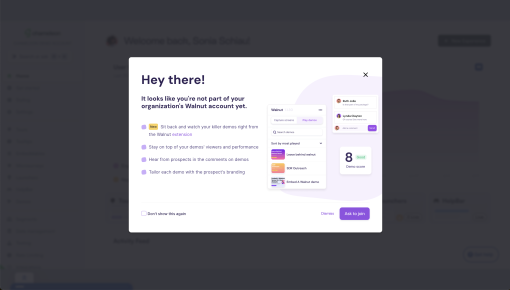
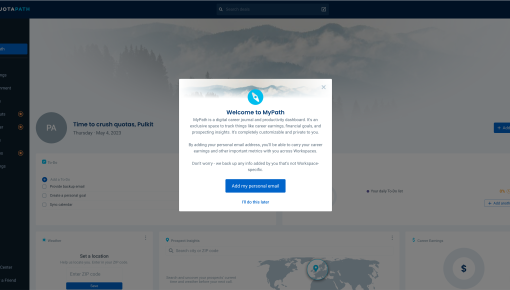
Start a free trial or talk to our team.
