









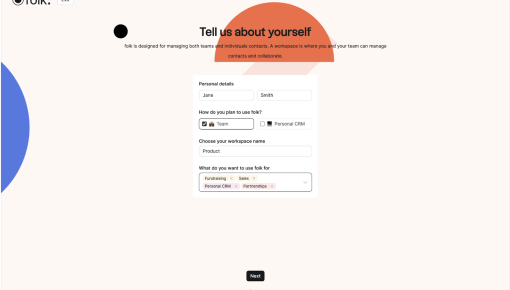
Folk's Onboarding Walkthrough
Ever signed up for a new tool and immediately questioned all your life choices? Nothing kills enthusiasm...



Existing customer? Sign in
Capture new users’ full attention with a large, center-screen welcome message that introduces your product’s value and guides them to get started or choose to explore later. Drive immediate engagement by making the welcome impossible to miss and offering clear next steps.
You have just seven seconds to make a first impression with new users—and 88% of users are less likely to return to a website after a bad user experience. For SaaS products, this critical window often determines whether a user becomes an active customer or churns before experiencing your product's value. This is where intrusive welcome messages come into play as a powerful user onboarding tool.
An intrusive welcome message is a modal dialog that appears prominently on a user's screen, typically during their first login or account setup. Unlike subtle notifications or tooltips, these modals demand attention by overlaying the entire interface with a lightbox effect. When designed thoughtfully, they can dramatically improve user activation rates and guide new users toward their first "aha moment."
In this guide, we'll explore what makes an intrusive welcome message effective, how to create welcome modals that drive user engagement, and the best practices for implementing these user onboarding welcome screens in your SaaS product. Whether you're a product manager looking to improve activation metrics or a growth professional optimizing your onboarding funnel, you'll learn how to leverage this template to create meaningful first impressions.
An intrusive welcome message is a full-screen modal that appears when users first enter your product, designed to capture their complete attention and guide them toward immediate value. Unlike passive onboarding elements, these welcome message templates create an unavoidable interaction point that users must engage with before proceeding.
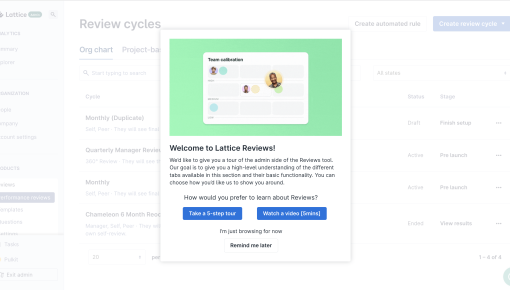
Modal Positioning and Visual Design Intrusive welcome messages appear in the center of the screen with a semi-transparent overlay (lightbox) that dims the background interface. This positioning ensures the modal becomes the primary focus, preventing users from interacting with other elements until they engage with the welcome screen.
Essential Components Effective user onboarding modals typically include: - Personalized heading incorporating the user's name or company - Clear value proposition explaining what users will accomplish - Dual CTA structure with primary and secondary action buttons - Visual elements like illustrations or product screenshots - Progress indicators showing onboarding steps ahead
What Makes It "Intrusive" The term "intrusive" refers to the modal's ability to interrupt the user's natural flow through your product. Unlike subtle nudges or corner notifications, these onboarding lightboxes require deliberate user action—either engagement or dismissal—before users can continue their journey.
Common Use Cases in SaaS Products Product teams typically deploy intrusive welcome messages for: - First-time user activation and orientation - Feature announcements for existing users - Account setup completion prompts - Trial-to-paid conversion campaigns - Product adoption initiatives for new capabilities
Chameleon's modal builder makes creating these user activation modals straightforward with no-code functionality and pre-built templates that ensure consistent, professional presentation across your product experience.
Creating effective intrusive welcome modals requires strategic planning around timing, targeting, and user experience design. Here's how to build welcome messages that drive meaningful engagement rather than frustration.
Timing Your Welcome Modal The most effective user onboarding welcome screens appear at moments when users are primed for guidance: - Immediately after account creation and email verification - During the first login to your product dashboard - When users access a new feature or upgraded plan - After completing initial profile setup steps
User Segmentation Considerations Not every user should see the same welcome message. Segment your audience based on: - User role (admin, end-user, viewer) - Company size (startup, mid-market, enterprise) - Traffic source (organic, paid, referral) - Previous product experience (new user vs. returning customer)
Frequency and Dismissal Rules Establish clear rules for when and how often users see your onboarding modal: - Show once per user session or account - Respect dismissal preferences for non-critical messages - Allow easy exit options without penalty - Track engagement to avoid over-targeting
Personalization Strategies Effective welcome screen design incorporates dynamic elements: - Use the user's first name in headlines ("Welcome, Sarah!") - Reference their company name or industry - Customize value propositions based on their use case - Include relevant product screenshots or examples
Value Proposition Messaging Your welcome message copy should immediately communicate: - What users will accomplish in the next few minutes - The specific benefit they'll receive - How this connects to their broader goals - Why taking action now matters
CTA Button Hierarchy Structure your call-to-action buttons strategically: - Primary CTA: Action-oriented language ("Start My Setup," "Show Me Around") - Secondary CTA: Alternative path ("Skip for Now," "Explore on My Own") - Dismissal option: Subtle "X" or "Maybe Later" link
Modal Positioning and Responsive Design Your product onboarding popup should: - Center perfectly on desktop screens (typically 500-600px wide) - Adapt gracefully to tablet and mobile viewports - Maintain readability across different screen sizes - Include appropriate padding and white space
Lightbox and Overlay Styling The background overlay should: - Use 60-80% opacity for optimal contrast - Prevent scrolling of underlying content - Include subtle animation for professional presentation - Allow keyboard navigation for accessibility
Chameleon's advanced targeting capabilities let you create sophisticated segmentation rules without complex coding. The platform's no-code modal builder includes responsive design templates, A/B testing functionality, and detailed analytics and integrations to track conversion rates and user engagement patterns.
Optimizing your user onboarding modal requires balancing user needs with business objectives. These proven strategies help create welcome messages that users appreciate rather than dismiss immediately.
User Journey Mapping Map your welcome modal timing to natural pause points in the user experience: - After users complete account setup but before exploring features - When users first access their dashboard with empty states - Following successful integration or data import - During moments of potential confusion or decision paralysis
Progressive Disclosure Approach Rather than overwhelming users with everything at once: - Focus on one primary action per modal - Save advanced features for subsequent onboarding steps - Use progressive profiling to gather information gradually - Connect each step to immediate, tangible value
Dynamic Content Strategies Leverage user data to create relevant experiences: - Role-based messaging: Different copy for admins vs. end users - Industry-specific examples: Use cases relevant to their sector - Integration-focused content: Highlight tools they already use - Goal-oriented pathways: Customize based on stated objectives
Behavioral Trigger Optimization Deploy intrusive modal best practices based on user actions: - Show feature-specific welcome messages when users access new areas - Trigger re-engagement modals after periods of inactivity - Present upgrade prompts when users hit plan limitations - Display success celebrations after completing key actions
Clear Value Communication Your welcome message template should immediately answer: - "What's in it for me?" (user benefit) - "How long will this take?" (time investment) - "What happens next?" (clear next steps) - "Can I skip this?" (user control)
Visual Hierarchy Best Practices Structure your onboarding lightbox for maximum clarity: - Headline: Bold, benefit-focused, under 8 words - Subheading: Specific value proposition, 1-2 sentences - Visual element: Screenshot, illustration, or icon - Primary CTA: Contrasting color, action-oriented text - Secondary options: Subtle but accessible
Scannable Content Structure Format your welcome screen design for quick comprehension: - Use bullet points for multiple benefits - Include plenty of white space - Limit text to essential information only - Employ consistent typography and spacing
Chameleon's behavioral targeting features allow you to create sophisticated trigger rules based on user actions, page visits, and engagement patterns. The platform's dynamic content capabilities enable real-time personalization without requiring complex development resources.
Tracking the right metrics ensures your intrusive welcome messages contribute meaningfully to user activation and product adoption goals.
Modal Engagement Rates Monitor these essential user onboarding modal metrics: - Completion rate: Percentage of users who click the primary CTA - Dismissal rate: Users who close without engaging - Time to engagement: How quickly users interact with the modal - Secondary action rate: Users who choose alternative paths
User Activation Indicators Connect modal performance to broader business outcomes: - Time to first value: How quickly users reach their "aha moment" - Feature adoption rates: Usage of highlighted capabilities - Trial-to-paid conversion: Impact on subscription upgrades - User retention: Long-term engagement improvements
Segmentation Analysis Break down performance by user characteristics: - Compare engagement across different user roles - Analyze effectiveness by traffic source or campaign - Track performance variations by company size or industry - Monitor seasonal or temporal patterns
A/B Testing Approaches Test different elements systematically: - Headline variations: Benefit-focused vs. feature-focused messaging - CTA button text: Action words vs. outcome-focused language - Visual elements: Screenshots vs. illustrations vs. minimal design - Timing adjustments: Immediate vs. delayed modal presentation
Iterative Improvement Process Establish a regular optimization cycle: - Review performance data monthly - Gather qualitative feedback through user interviews - Test one element at a time for clear attribution - Document learnings for future template development
User Feedback Integration Collect insights to inform welcome message improvements: - Include optional feedback surveys after modal interaction - Monitor support tickets related to onboarding confusion - Conduct user testing sessions with new customers - Track correlation between modal engagement and support requests
When should I use an intrusive welcome message vs. other onboarding methods? Use intrusive welcome modals when you need to ensure critical information reaches users or when guiding them toward high-impact actions. Choose less intrusive methods like tooltips or progress bars for secondary features or when users are already engaged in specific workflows.
How do I personalize welcome messages for different user segments? Leverage user data from signup forms, integrations, or behavioral tracking to customize headlines, value propositions, and recommended actions. Create separate modal variations for different roles, company sizes, or use cases rather than trying to make one message work for everyone.
What's the ideal timing for showing welcome modals? Display welcome messages when users are most receptive to guidance—typically after completing setup steps but before they start exploring independently. Avoid interrupting active workflows or appearing immediately upon login without context.
How can I measure the effectiveness of my welcome messages? Track both engagement metrics (completion rates, time spent) and business outcomes (feature adoption, activation rates, retention). The most important measure is whether users who engage with your welcome modal achieve success faster than those who don't.
What are alternatives to intrusive welcome modals? Consider progressive onboarding with tooltips, interactive product tours, empty state guidance, or contextual nudges. These approaches can be less disruptive while still providing necessary guidance, especially for users who prefer self-directed exploration.
Intrusive welcome messages, when implemented thoughtfully, serve as powerful tools for user activation and product adoption. By focusing on user value, strategic timing, and continuous optimization, product teams can create welcome experiences that users appreciate rather than dismiss. Remember that the goal isn't just to capture attention—it's to guide users toward meaningful engagement with your product's core value proposition.

Start a free trial or talk to our team.
