









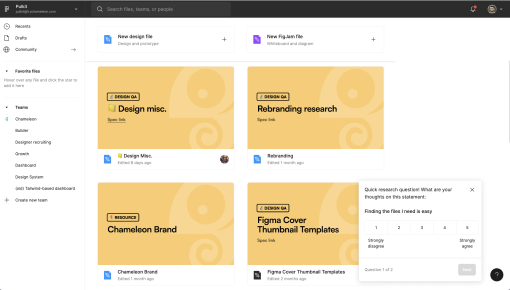
Figma's Microsurvey
Figma’s microsurvey is a quick, thoughtful touch to gather feedback on file navigation. The first question...



Existing customer? Sign in
Identify which product features users find most valuable by asking them to select their top choices from a dropdown menu, helping you focus development on what matters most to your customers.
Understanding which features truly matter to your users is the difference between building a product people love and one they tolerate. A product feature feedback survey cuts through the noise of usage analytics and feature requests to reveal what your users actually value—and what they'd miss if it disappeared tomorrow.
This systematic approach to gathering user opinions helps product teams make data-driven decisions about feature prioritization, roadmap planning, and resource allocation. Unlike broad product feedback surveys, feature feedback surveys focus specifically on evaluating the perceived value and importance of individual product capabilities.
With Chameleon's Survey feature, you can collect this critical feedback seamlessly within your product experience, reaching users at the exact moment when their opinions are most informed and actionable.
A product feature feedback survey is a structured questionnaire designed to gather user opinions on the value, importance, and utility of specific product features. These surveys typically use dropdown or rating formats to make responses easy to analyze and compare across your user base.
The key differentiator from general product feedback is the focused scope. Instead of asking "How can we improve our product?" you're asking "Which of these features provides the most value to your workflow?" This specificity yields actionable insights that directly inform feature prioritization and development decisions.
Timing matters significantly with feature feedback surveys. The most valuable responses come from users who have had sufficient exposure to multiple features—typically after completing onboarding, following a major feature release, or during quarterly product health assessments. This ensures respondents can make informed comparisons rather than guessing about features they haven't experienced.
Unlike usage analytics that show what users do, feature feedback surveys reveal why they do it and how they feel about it. A feature might have low usage but high perceived value for specific use cases, or high usage but low satisfaction. This qualitative layer adds crucial context to your quantitative data.
Chameleon's targeting capabilities ensure your surveys reach users who can provide meaningful feedback. By leveraging user behavior data and properties, you can survey power users about advanced features while asking newer users about core functionality—maximizing the relevance and quality of responses.
Step 1: Identify Your Feature List and Survey Timing Start by cataloging the features you want to evaluate. Focus on 8-12 key features to avoid overwhelming respondents while ensuring comprehensive coverage. Consider grouping related features or running separate surveys for different product areas.
Step 2: Customize the Dropdown Options Structure your dropdown to include all relevant features plus options like "I haven't used this feature" or "Not applicable to my role." This prevents forced responses and provides cleaner data about actual feature experience.
Step 3: Set Up Targeting Criteria Define who should see your survey based on user segments, usage patterns, and tenure. Power users can evaluate advanced features, while newer users should focus on core functionality. Chameleon's behavioral targeting lets you survey users based on specific actions, page visits, or feature usage patterns.
Step 4: Configure Survey Appearance and Placement Choose survey placement that feels natural within your product flow. Chameleon's survey builder offers multiple display options—from subtle corner notifications to full-screen overlays—ensuring the survey feels integrated rather than intrusive.
Step 5: Launch and Monitor Response Rates Start with a small user segment to test response rates and question clarity. Chameleon's real-time analytics and AI survey summaries show response patterns immediately, allowing quick adjustments to targeting or timing if needed.
Step 6: Analyze Results and Create Action Plans Use survey data to identify your most and least valued features. Look for patterns across user segments and correlate responses with usage data. This analysis directly informs roadmap prioritization and resource allocation decisions.
Chameleon's integration with product analytics tools allows you to understand additional context around survey responses, creating a complete picture of feature value.
Timing: Survey Users After Feature Exposure The best feature feedback comes from users who have experienced multiple features in real workflows. Survey too early and responses lack context; too late and recency bias affects accuracy. Target users 2-4 weeks after onboarding completion or major feature releases.
Segmentation: Match Features to User Types Different user segments care about different features. Sales teams value CRM integrations while developers prioritize API functionality. Chameleon's personalization capabilities let you show relevant feature lists based on user properties, job roles, or usage patterns.
Question Design: Balance Comprehensiveness with Usability Include enough features to get meaningful insights but not so many that survey fatigue sets in. Group similar features and use clear, jargon-free descriptions. Consider including brief explanations for complex features to ensure consistent understanding.
Follow-up: Connect Feedback to Product Decisions Survey data should directly influence roadmap planning and feature development priorities. Share results with stakeholders and document how feedback shaped product decisions. This creates a feedback loop that shows users their input matters.
Frequency: Respect User Experience Quarterly feature surveys work well for most products, with additional surveys following major releases. Use Rate Limiting to avoid survey fatigue by spacing requests appropriately and exclude segments of users who recently completed other surveys.
Response Incentives: Offer Value Exchange Consider providing early access to new features, product roadmap insights, or account credits in exchange for survey completion. The incentive should match your user base's preferences and your product's value proposition.
Chameleon's integration with product analytics tools enables sophisticated survey optimization. You can correlate survey responses with actual feature usage, identify discrepancies between stated and revealed preferences, and refine targeting based on response quality patterns.
Feature Prioritization for Product Roadmaps Use feature feedback surveys to validate roadmap priorities with actual user preferences. When choosing between multiple development paths, user-reported feature value provides crucial input alongside technical feasibility and business impact assessments.
Post-Launch Feature Adoption Assessment After releasing new features, survey users to understand perceived value versus actual adoption. Low-value, high-effort features might need better positioning or UX improvements, while high-value, low-adoption features may require better discovery or onboarding.
Quarterly Product Health Checks Regular feature surveys track how user preferences evolve over time. Features that were highly valued six months ago might become table stakes, while emerging use cases create demand for new capabilities.
User Onboarding Optimization Survey new users about which features drove their initial value realization. This insight helps optimize onboarding flows to emphasize high-impact features and reduce time-to-value for future users.
Feature Sunset Decision-Making Before deprecating features, survey users to understand actual usage and value. Sometimes low-usage features serve critical niche use cases that would significantly impact user satisfaction if removed.
Competitive Feature Analysis Include competitor features in surveys to understand user preferences and identify differentiation opportunities. This helps prioritize features that provide competitive advantages versus those that achieve parity.
Q: How often should we run product feature feedback surveys? Quarterly surveys work well for most SaaS products, with additional surveys following major releases. Chameleon's Rate Limiting ensures you don't over-survey individual users while maintaining regular feedback collection across your user base.
Q: What's the ideal number of features to include in the dropdown? Aim for 8-12 features to balance comprehensiveness with usability. More than 15 options typically reduce response quality due to survey fatigue. Consider running separate surveys for different product areas if you need to evaluate more features.
Q: How do we ensure high response rates for feature surveys? Target engaged users who have experience with multiple features, use clear and concise questions, and provide value in exchange for participation. Chameleon's contextual timing and behavioral targeting significantly improve response rates compared to external survey tools.
Q: Should we survey all users or specific segments? Segment your surveys based on user types, tenure, and feature usage patterns. New users should evaluate core features while power users can provide feedback on advanced capabilities. This approach yields more relevant and actionable insights.
Q: How do we act on conflicting feedback about feature value? Analyze conflicts by user segment, usage patterns, and business impact. Sometimes features serve different purposes for different user types. Use Chameleon's analytics integrations to correlate survey responses with actual usage data for deeper insights.
Start a free trial or talk to our team.
