









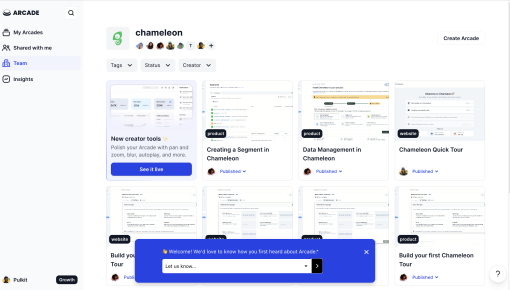
Arcade's Feedback Microsurvey
Arcade’s microsurvey is the introvert’s dream of collecting feedback: quick, unobtrusive, and straight to...



Existing customer? Sign in
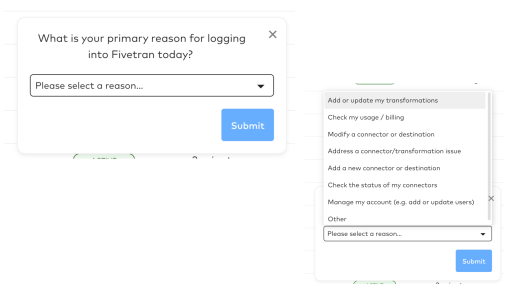
Share feedback quickly by selecting from a dropdown menu to let the product team know which areas need improvement, helping them focus on what matters most to you.
Product teams live and breathe user feedback—it's the compass that guides every feature decision, design iteration, and strategic pivot. Yet many teams struggle with collecting structured, actionable feedback that actually drives product improvements. Enter feedback survey templates: your secret weapon for turning scattered user opinions into clear product direction.
A feedback survey template provides a standardized framework for collecting user insights at scale. Rather than crafting surveys from scratch each time, templates like "We'd love to hear your thoughts" with dropdown answer options streamline the process while ensuring consistency across your feedback collection efforts. The result? Higher response rates, cleaner data, and insights that actually translate into product wins.
This guide explores how to create feedback surveys that users want to complete and product teams can act on, with a focus on dropdown-based templates that make feedback collection both user-friendly and analytically powerful.
A feedback survey template is a pre-structured format for collecting user opinions, experiences, and suggestions about your product. Unlike generic customer satisfaction surveys or detailed user research studies, product feedback survey templates are specifically designed to gather actionable insights that inform product development decisions.
The most effective feedback survey templates follow a simple structure: a welcoming headline ("We'd love to hear your thoughts"), a brief explanatory subheading, and dropdown answer options that make responding quick and effortless. This format works because it respects users' time while providing product teams with standardized data that's easy to analyze and act upon.
Dropdown survey questions offer several advantages over open-text responses. They eliminate response bias, ensure data consistency, and dramatically improve completion rates—users can answer in seconds rather than minutes. The key is crafting dropdown options that are mutually exclusive, comprehensive, and aligned with your product goals.
Pre-built templates save product teams significant time compared to creating surveys from scratch. They also incorporate proven best practices around question structure, response options, and user experience design. Most importantly, templates ensure consistency across different feedback collection campaigns, making it easier to track trends and compare results over time.
Implementing a feedback survey template effectively requires strategic thinking about timing, targeting, and customization. Start by identifying your specific feedback objectives—are you evaluating a new feature, understanding user pain points, or measuring overall product satisfaction?
The setup process begins with customizing the template for your use case. Modify the headline to match your brand voice while keeping it welcoming and specific. Adjust dropdown options to reflect the feedback categories most relevant to your product goals. For example, a project management tool might include options like "Task organization," "Team collaboration," and "Reporting features."
Deploy feedback surveys at strategic moments in the user journey. Post-feature launch surveys capture immediate reactions while users' experiences are fresh. Regular interval surveys (monthly or quarterly) help track satisfaction trends over time. Behavior-triggered surveys—launched after specific user actions—often yield the highest response rates and most relevant insights.
Chameleon's Survey feature makes this process seamless with no-code survey creation and advanced targeting capabilities. You can segment users based on behavior, demographics, or product usage patterns, ensuring each survey reaches the most relevant audience. The platform's native look and feel means surveys appear naturally within your product interface, maintaining user flow while collecting valuable feedback.
Timing considerations are crucial for maximizing response rates. Avoid survey fatigue by spacing requests appropriately and targeting users when they're most engaged with your product. Chameleon's automation features let you set intelligent triggers based on user behavior, ensuring surveys appear at optimal moments without manual intervention.
Effective product feedback surveys balance comprehensiveness with brevity. Keep surveys focused on 3-5 key questions maximum—users appreciate surveys they can complete in under two minutes. Structure questions logically, starting with broader topics before diving into specifics.
Crafting effective dropdown options requires careful consideration. Each option should be mutually exclusive (no overlap between choices) and collectively exhaustive (covering all reasonable responses). Always include an "Other" option with a text field for responses that don't fit your predetermined categories. This prevents user frustration while capturing unexpected insights.
Response rate optimization starts with clear value communication. Tell users how their feedback will be used and when they can expect to see changes. Phrases like "Help us improve your experience" or "Your input shapes our roadmap" create emotional investment in the survey process.
Follow-up actions are where many teams falter. Establish clear processes for reviewing feedback, prioritizing insights, and communicating back to users. Close the feedback loop by sharing how user input influenced product decisions—this builds trust and increases future survey participation.
Avoid survey fatigue by being strategic about frequency and targeting. Track response rates across different user segments and adjust your approach accordingly. Users who frequently engage with surveys might appreciate more detailed questionnaires, while occasional users prefer quick, focused surveys.
Post-onboarding feedback collection helps identify friction points in your user activation process. Deploy surveys 7-14 days after signup to capture users' initial impressions while their experience remains fresh. Focus dropdown options on onboarding steps: "Account setup," "First feature use," "Navigation," and "Getting started resources."
Feature-specific improvement surveys target users who've interacted with particular product areas. These surveys provide focused insights for iterative improvements and help prioritize development resources. Chameleon's behavioral targeting makes it easy to survey only users who've actually used the feature in question.
Regular product health checks—deployed monthly or quarterly—track satisfaction trends and identify emerging issues before they become major problems. These surveys typically include broader categories like "Overall experience," "Performance," "Feature availability," and "Support quality."
Pre-churn intervention surveys target users showing disengagement signals. By understanding why users are pulling away, product teams can address issues proactively and improve retention. Focus on barriers to value realization and missing functionality that might bring users back.
Beta feature feedback represents one of the most valuable survey applications. Early adopters provide crucial insights for feature refinement before broader release. Chameleon's targeting capabilities ensure beta surveys reach only qualified users, maintaining program exclusivity while gathering focused feedback.
How do I customize dropdown survey options? Start with broad categories relevant to your product, then refine based on initial responses. Include 4-7 options maximum, ensure they're mutually exclusive, and always provide an "Other" option. Test options with internal teams before deployment.
When should I send feedback surveys to users? Timing depends on your objectives. Post-action surveys (immediately after feature use) capture immediate reactions. Delayed surveys (1-2 weeks later) provide more thoughtful responses. Avoid surveying the same users more than once monthly.
What's the ideal response rate for product feedback surveys? In-app surveys typically achieve 10-30% response rates, significantly higher than email surveys. Rates vary by user segment, survey length, and timing. Focus on response quality over quantity—engaged users provide more valuable insights.
How do I analyze dropdown survey responses? Group responses by category and track trends over time. Look for patterns across user segments and correlate feedback with behavioral data. Chameleon's AI survey summaries provide real-time insights and trend analysis without manual data processing.
Can I automate feedback survey deployment? Yes, automation improves both efficiency and targeting accuracy. Set behavioral triggers (feature usage, time-based actions, engagement levels) to deploy surveys at optimal moments. Chameleon's smart triggers ensure surveys reach the right users without manual intervention.
Feedback survey templates transform scattered user opinions into structured insights that drive product success. By implementing dropdown-based surveys strategically, product teams can collect actionable feedback while respecting users' time and attention. The key lies in thoughtful customization, strategic timing, and consistent follow-through on the insights you gather.
Start a free trial or talk to our team.
