









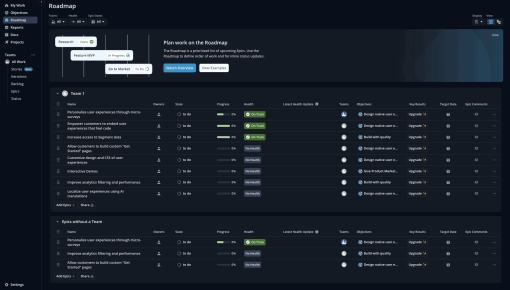
Shortcut's Embedddable Card
Shortcut uses an Embeddable Card to nudge new users to discover their "Roadmaps" feature. The team uses a...



Existing customer? Sign in
Inform users about ongoing system maintenance in a clear and reassuring way, helping set expectations and reduce confusion during temporary downtime. Maintain user trust by providing transparent updates without requiring any action from users.
System maintenance is an inevitable reality for every SaaS product. Whether you're rolling out security patches, upgrading infrastructure, or optimizing performance, these necessary interruptions can frustrate users and damage trust if not handled properly. Poor communication during downtime leaves users confused, worried about data loss, and questioning your product's reliability.
The solution? Proactive in-app downtime notification banners that set clear expectations and maintain transparency with your users. These simple yet effective notifications transform potentially negative experiences into opportunities to demonstrate professionalism and user-centric thinking. Chameleon's downtime notification banner template provides product teams with a proven framework for communicating maintenance activities clearly and empathetically, helping preserve user satisfaction even during service interruptions.
An in-app downtime notification banner is a temporary, non-intrusive message that appears within your product interface to inform users about ongoing or planned system maintenance. Unlike error messages that indicate something has gone wrong, these proactive notifications serve as transparent communication tools that manage user expectations before, during, or after maintenance windows.
These banners are characterized by their informational nature—they're typically text-only notifications that don't require user action or include call-to-action buttons. Their primary purpose is to acknowledge the maintenance situation, provide relevant timing information, and reassure users that the interruption is intentional and temporary.
Product teams deploy in-app maintenance alerts to differentiate planned maintenance from unexpected outages, reduce support ticket volume, and maintain user trust during service disruptions. Unlike promotional banners or feature announcements, downtime notifications focus solely on operational transparency and user communication.
The most effective system maintenance banners strike a balance between being noticeable enough to inform users while remaining subtle enough not to disrupt their workflow unnecessarily. They serve as a bridge between your technical operations and user experience, ensuring that necessary backend work doesn't come at the expense of user satisfaction.
Implementing effective downtime notification banners requires strategic planning around timing, targeting, and placement. The planning phase begins well before maintenance starts—ideally, you'll deploy notifications 24-48 hours in advance for scheduled maintenance, allowing users to plan accordingly and complete time-sensitive tasks.
Chameleon's platform makes banner creation and deployment straightforward through its intuitive editor. Product teams can quickly craft text-based notifications, customize styling to match their product's design system, and set up targeting rules without requiring developer resources. The no-code approach means you can create, modify, and deploy notifications in real-time as situations evolve.
Targeting considerations are crucial for effective downtime communication. Not all users need to see every maintenance notification—Chameleon's advanced targeting capabilities allow you to segment notifications based on user behavior, subscription tiers, geographic location, or feature usage patterns. For example, you might only notify users of API maintenance if they actively use integrations, or target database maintenance notifications to power users who rely heavily on data-intensive features.
Timing and duration require careful consideration. Deploy notifications early enough to be helpful but not so early that users forget about the maintenance window. During maintenance, update the banner text to reflect current status ("Currently undergoing maintenance" vs. "Scheduled maintenance starting at 2 PM EST"). Remove notifications promptly once maintenance concludes, ideally replacing them with a brief "maintenance complete" message before full removal.
Optimal banner placement ensures visibility without disrupting user workflows. Top-of-page banners work well for broad announcements, while contextual placement near affected features provides more targeted communication. Chameleon's flexible positioning options and embedded options let you experiment with different placements and measure their effectiveness through built-in analytics.
Effective downtime notification banners follow several key principles that maximize user understanding while minimizing frustration. Message clarity stands as the most critical factor—use simple, jargon-free language that any user can understand, regardless of their technical background. Avoid internal terminology or technical details that don't directly impact the user experience.
Timing transparency builds trust and helps users plan around maintenance windows. When possible, provide specific timeframes rather than vague estimates. "Maintenance scheduled from 2-4 PM EST today" is far more helpful than "brief maintenance window this afternoon." If maintenance duration is uncertain, communicate that honestly while providing regular updates.
Tone considerations require balancing professionalism with empathy. Acknowledge that maintenance interruptions are inconvenient while explaining their necessity. Phrases like "We apologize for any inconvenience" show consideration for user impact, while "This maintenance will improve system performance" explains the benefit users will receive.
Visual design should make banners noticeable without being disruptive. Use your product's existing color scheme and typography to maintain design consistency. Avoid bright colors or animations that might feel alarming—maintenance notifications should feel informative, not urgent.
Follow-up communication demonstrates thoroughness and user consideration. After maintenance concludes, briefly notify users that systems are fully operational and thank them for their patience. This closing communication reinforces that the maintenance was planned and successful, not an ongoing issue.
Testing different messaging approaches through A/B testing helps optimize notification effectiveness. Experiment with different levels of detail, timing strategies, and tone variations to understand what resonates best with your user base. Chameleon's analytics capabilities and integrations with analytics providers make it easy to measure engagement and user behavior during maintenance periods.
Downtime notification banners serve various maintenance scenarios, each requiring slightly different communication approaches. Scheduled system upgrades represent the most common use case, typically involving infrastructure improvements or major feature deployments that require temporary service interruptions.
Security patches and updates often happen on shorter notice but remain critical for user safety. These notifications should emphasize the security benefits while acknowledging the timing constraints that prevent longer advance notice.
Database maintenance scenarios require careful communication since users often worry about data safety during these operations. Reassure users that their data remains secure while explaining any temporary limitations on data access or synchronization.
Third-party integration updates affect specific user segments who rely on connected services. Target these notifications to relevant users while providing alternative workflows when possible.
Performance optimization work offers an opportunity to frame maintenance positively, emphasizing speed improvements and enhanced reliability that users will experience post-maintenance.
Emergency maintenance situations require rapid deployment and frequent updates. While these can't be planned in advance, having notification templates ready enables quick communication during unexpected issues.
How long should downtime notifications stay active? Deploy notifications 24-48 hours before scheduled maintenance, keep them active throughout the maintenance window, and remove them within 1-2 hours after completion. For emergency maintenance, deploy immediately and update frequently.
Should you notify users before, during, or after maintenance? The most effective approach includes all three phases: advance notice for planning, status updates during maintenance, and completion confirmation afterward. This comprehensive communication strategy maximizes transparency and user satisfaction.
How do you customize downtime notification banners in Chameleon? Chameleon's editor allows complete customization of banner text, styling, positioning, and targeting rules. You can match your product's design system, set up advanced user segmentation, and schedule notifications in advance through the intuitive interface.
What's the difference between downtime banners and error messages? Downtime banners are proactive communications about planned maintenance, while error messages react to unexpected problems. Banners set expectations and maintain trust; error messages address immediate technical issues.
How do you measure the effectiveness of maintenance notifications? Track metrics like notification view rates, user behavior during maintenance windows, support ticket volume, and user sentiment through surveys. Chameleon's analytics and integrations with analytics tools provide detailed insights into notification performance and user engagement.
Can you schedule downtime notifications in advance? Yes, Chameleon's scheduling features allow you to set up notifications days or weeks in advance, automatically deploying them at predetermined times and removing them when maintenance concludes.
What information should be included in maintenance alerts? Include the maintenance purpose, expected duration, affected features or services, and any alternative resources available. Keep information relevant to user impact rather than technical implementation details.
Ready to implement transparent downtime communication in your product? Try Chameleon's downtime notification banner template to keep your users informed and maintain trust during necessary maintenance windows.
Start a free trial or talk to our team.
