









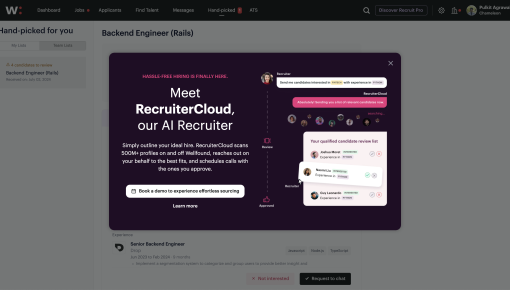
Wellfound's Upsell Modal
This Wellfound upsell modal keeps it sharp and snappy, introducing RecruiterCloud like your new secret...



Existing customer? Sign in
Prompt free users to upgrade by showing a clear, friendly message when they try to access a premium feature, making it easy for them to see the value and choose to upgrade or continue for free. Encourage conversions at the exact moment users are most interested in unlocking more functionality.
Only 2-5% of freemium users ever convert to paid plans—but the right moment can change everything. When free users hit a premium feature wall, you have seconds to turn frustration into motivation. A well-crafted gated feature upsell modal transforms that critical moment from a dead end into your biggest conversion opportunity.
The challenge is real: users discover a valuable feature, get excited about its potential, then hit a paywall with no clear path forward. Poor timing, weak messaging, or clunky upgrade flows kill conversions before they start. But when you nail the experience—showing value first, timing the ask perfectly, and making upgrading feel like the obvious next step—those conversion rates can jump to 15% or higher.
This guide breaks down exactly how to implement gated feature upsell modals that convert, including a proven template, step-by-step implementation, and advanced optimization strategies that turn feature discovery into revenue growth.
A gated feature upsell modal is an in-app message that appears when free users attempt to access premium functionality. Unlike generic upgrade prompts, these modals are contextual—they appear at the exact moment users discover value, making the upgrade feel natural rather than pushy.
These modals typically appear when users click on premium features, reach usage limits, or try to access advanced functionality. The best ones include four core components: an attention-grabbing headline that names the specific feature, a clear explanation of what they're missing, a compelling upgrade path that emphasizes benefits, and a respectful exit option that doesn't punish users for staying free.
The key distinction lies between hard gates and soft gates. Hard gates completely block access until users upgrade, while soft gates allow limited functionality or preview access before requiring payment. Soft gates often convert better because they let users experience value before asking for commitment.
The psychology behind effective feature gating centers on loss aversion and the endowment effect. When users discover a feature they want, they mentally "own" it. The modal reframes upgrading not as spending money, but as keeping something valuable they've already found. Chameleon's modal builder makes creating these contextual experiences seamless, with targeting rules that ensure perfect timing and personalization options that speak directly to each user's needs.
Successful implementation starts with identifying the right gating opportunities. Look for features that provide clear, immediate value—advanced analytics, collaboration tools, or automation capabilities work well. Avoid gating core functionality that users need for basic success, as this creates frustration rather than motivation.
Setting up triggers requires precision. The modal should appear when users actively seek the premium feature, not randomly during their workflow. Common triggers include clicking premium feature buttons, reaching free plan limits, or attempting specific actions like exporting data or inviting team members.
Customizing messaging means adapting your template copy to each specific feature. Instead of generic "upgrade to premium" language, use feature-specific benefits: "Unlock advanced reporting to track your team's performance" or "Add unlimited integrations to streamline your workflow." The messaging should feel like a natural extension of what they were already trying to accomplish.
Configuring CTAs involves more than just adding an "Upgrade Now" button. Create upgrade flows that match user intent—if they're trying to add team members, take them directly to team plan options. If they want advanced analytics, highlight plans with reporting features. Track these conversion paths to understand which features drive the most upgrades.
With Chameleon, you can leverage targeting rules for precise timing based on user behavior, plan type, and feature usage patterns. The platform's user data integration enables personalized messaging that references specific actions or goals. You can make your gated modals work together with existing onboarding tours, creating a seamless journey from feature discovery to upgrade.
Timing determines everything in feature gating. Show modals when users are actively engaged and seeking value, not when they're focused on other tasks. The best moments occur during feature exploration, when users are already in a discovery mindset. Avoid interrupting critical workflows or appearing immediately after users log in.
Value-first messaging focuses on what users gain, not what they're missing. Instead of "This feature requires a premium plan," try "Unlock advanced reporting to make data-driven decisions faster." Frame limitations as opportunities and emphasize immediate benefits rather than plan features.
Progressive disclosure works better than immediate hard gates. Start with soft gates that show feature previews or limited functionality, then escalate to full gates for users who demonstrate strong interest. This approach builds desire while respecting user autonomy.
Personalization tactics leverage user behavior data for relevant messaging. Reference specific actions they've taken, goals they've indicated, or features they've already used. A user who frequently exports data should see messaging about advanced export options, while someone managing a team should hear about collaboration features.
Visual design principles ensure modals feel helpful rather than intrusive. Use your product's existing design language, include relevant feature screenshots or icons, and maintain appropriate contrast and spacing. The modal should feel like a natural part of the product experience, not an external advertisement.
Advanced strategies include combining modals with interactive demos that show feature value before gating, using appropriate social proof like customer testimonials or usage statistics, and creating multiple upgrade paths that match different user intents and budgets.
When should I gate features in my SaaS product? Gate features when users have experienced core value and are actively exploring advanced functionality. Avoid gating during initial onboarding or critical workflows that determine product success.
How do I customize upsell modal copy for different features? Focus on feature-specific benefits rather than generic plan descriptions. Reference the exact action users were trying to take and explain how upgrading enables that specific goal.
What's the difference between hard and soft feature gating? Hard gates completely block access until upgrade, while soft gates provide limited functionality or previews. Soft gates typically convert better by letting users experience value first.
How do I measure the success of my upsell modals? Track conversion rates from modal view to upgrade, time from modal appearance to conversion, and user satisfaction scores. Also monitor feature adoption rates post-upgrade to ensure you're attracting the right users.
Can I A/B test different modal designs? Yes, test different messaging approaches, visual designs, and CTA placements. Focus on one variable at a time and ensure statistical significance before making changes.
Track key metrics including modal conversion rates, time to upgrade after modal appearance, and user satisfaction with the gating experience. Monitor feature adoption rates post-upgrade to ensure gated users become successful customers. Use Chameleon's integrations with analytics providers to get detailed insights into user paths and conversion funnels, enabling data-driven optimization. Use this data to iterate on messaging, timing, and targeting rules for continuous improvement.
The most successful gated feature upsell modals feel like helpful guidance rather than sales pitches. They appear at the perfect moment, speak to specific user needs, and make upgrading feel like the natural next step in achieving user goals. With the right implementation and continuous optimization, these modals become powerful drivers of sustainable revenue growth.
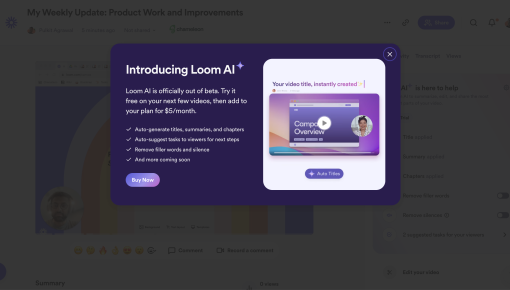
Start a free trial or talk to our team.
