









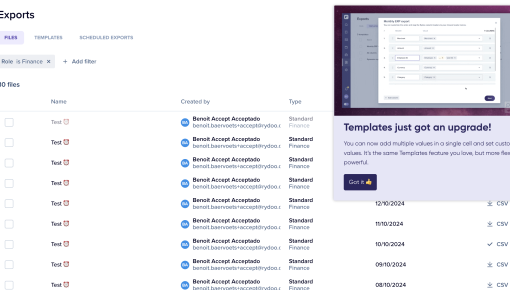
Rydoo's Feature Update Modal
A Modal with catchy media that shows a feature update in action and communicates how users can use it.



Existing customer? Sign in
Announce a new feature in a way that grabs users’ attention, explains its benefits, and encourages immediate engagement while giving users the option to snooze or dismiss the message.
You've just shipped an amazing new feature that could transform how your users work. But here's the problem: without a proper announcement strategy, even your best features can go completely unnoticed. Studies show that users typically discover only 20% of available product features on their own, leaving 80% of your development efforts invisible to the people who need them most.
This is where new feature announcement templates become game-changers for product teams. A well-designed feature announcement modal acts as a spotlight, ensuring your latest innovations get the attention they deserve. Lightbox modals are particularly effective because they dim the background interface and focus user attention entirely on your message—creating an impossible-to-ignore moment of engagement.
Chameleon's new feature announcement template streamlines this entire process, giving product teams a conversion-optimized solution that connects seamlessly with guided tours, interactive demos, and user feedback collection. Instead of building announcement modals from scratch or relying on easily-missed email notifications, you can deploy professional-grade feature announcements in minutes.
A new feature announcement template is a pre-built modal designed specifically to introduce new product features to your users at the right moment in their journey. Unlike generic pop-ups or notification banners, these templates are purpose-built for feature discovery and adoption.
The lightbox functionality is what makes these announcements so effective. When triggered, the modal appears over your product interface while dimming the background, creating a focused environment where users can't help but notice your message. This approach generates significantly higher engagement rates compared to passive announcement methods like in-app banners or email notifications.
Every effective feature announcement template includes four essential components:
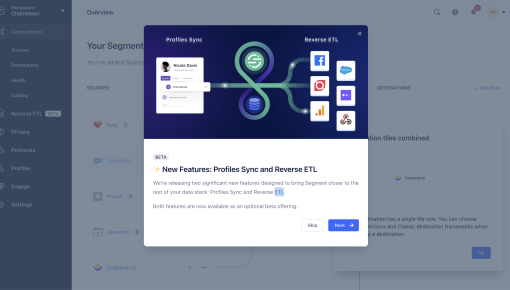
Eye-catching heading with visual elements - A compelling headline that immediately communicates the feature's value, often enhanced with emojis or icons to grab attention and convey emotion.
Clear subheading explaining the feature benefit - A concise description that focuses on what users can accomplish with the new feature, not just what it does technically.
Primary CTA for immediate engagement - An action button that encourages users to try the feature right away, such as "Explore Now" or "Get Started."
Secondary CTA for user control - A dismiss or "Remind Me Later" option that respects user autonomy while keeping the door open for future engagement.
This structure contrasts sharply with other announcement methods. Email notifications often get buried in crowded inboxes, tooltip-based announcements are easily missed during quick workflows, and banner notifications can be dismissed without consideration. Feature announcement modals demand attention while still providing users control over their experience.
Creating effective feature announcements requires strategic thinking about timing, messaging, and user segmentation. The setup process begins with identifying the optimal moment to introduce your new feature—typically when users are actively engaged in related workflows or during natural transition points in their journey.
Start by customizing the heading and subheading for your specific feature. Focus on user benefits rather than technical specifications. Instead of "New API Integration Available," try "Connect Your Favorite Tools in One Click 🔗." Configure your CTA buttons based on the desired user action—whether that's exploring the feature immediately, watching a demo, or scheduling time to learn more.
Setting targeting rules is crucial for announcement success. Consider user segments, feature access levels, and behavioral triggers. You don't want to announce premium features to free-tier users or show advanced functionality to brand-new users who haven't mastered the basics yet.
Implementation with Chameleon transforms this process entirely. Chameleon's template gallery provides conversion-optimized designs that you can deploy immediately, eliminating the need for design resources or lengthy development cycles. The platform's audience segmentation capabilities let you target announcements with surgical precision—reaching only users who will find the feature relevant and valuable.
The real power emerges when you connect announcements to Chameleon's other engagement tools. Link your feature announcement directly to Interactive Demos that let users explore functionality hands-on, or connect to Tours that provide step-by-step guidance through complex features. This creates a seamless experience from discovery to mastery.
Timing and triggers require careful consideration. Launch announcements during active user sessions when attention levels are high, but avoid overwhelming users with multiple announcements in short timeframes. Consider the user's journey stage and feature relevance—a power user might appreciate advanced functionality announcements that would confuse a newcomer.
Successful feature announcements follow proven content and design principles that maximize engagement while respecting user experience.
Content guidelines focus on clarity and benefit-driven messaging. Keep headlines concise and benefit-focused—users should understand the value proposition within seconds. Use action-oriented language in CTAs that creates urgency without being pushy. "Discover Your New Dashboard" works better than generic "Learn More" buttons. Include visual elements like emojis or icons strategically to draw attention and convey emotion, but avoid overuse that appears unprofessional.
Most importantly, highlight specific user benefits rather than feature descriptions. Users care about what they can accomplish, not the technical details of how you built it.
Design principles ensure your announcements feel native to your product experience. Maintain brand consistency in modal styling—colors, fonts, and visual elements should align with your existing interface. While desktop is the primary focus, ensure your modals remain functional across different screen sizes. Use contrasting colors for CTA buttons to make them stand out, and keep modal size appropriate for content length to avoid overwhelming users.
Targeting strategy prevents announcement fatigue while maximizing relevance. Segment users based on feature relevance using behavioral data, subscription tiers, or usage patterns. Implement frequency caps to avoid overwhelming users with too many announcements. A/B test different messaging approaches to optimize engagement rates—test headlines, CTA copy, and even timing to find what resonates with your audience.
Track engagement metrics continuously for optimization. Monitor click-through rates, feature adoption following announcements, and user feedback to refine your approach.
Integration with the broader user journey amplifies announcement effectiveness. Connect announcements to your onboarding flows for new users discovering features organically. Use Surveys to gather feedback on announced features, helping you understand adoption barriers and improvement opportunities. Follow up with contextual nudges that encourage feature usage at relevant moments. Most importantly, measure the impact on product adoption metrics to demonstrate ROI and guide future announcement strategies.
Chameleon's customization options let you align announcements perfectly with your brand identity. You can modify colors, fonts, button styles, and spacing to match your existing interface. The platform also supports custom CSS for advanced styling needs, and you can upload brand assets like logos or custom icons to maintain visual consistency.
Timing depends on user behavior and feature complexity. Show announcements during active sessions when users are engaged, typically after they complete a workflow or navigate to a relevant section. For major features, consider announcing during login or dashboard visits. For workflow-specific features, trigger announcements when users access related functionality.
Track multiple metrics including click-through rates on announcement CTAs, feature adoption rates following announcements, and user engagement with connected demos or tours. Chameleon's analytics dashboard and integrations with product analytics tools let you measure both immediate engagement and long-term feature adoption impact.
Chameleon's testing capabilities allow you to experiment with different headlines, CTA copy, visual elements, and timing strategies. You can run split tests to optimize engagement rates and feature adoption, using statistical significance to guide decisions about which approaches work best for your audience.
Lightbox modals create focused attention by dimming the background interface, making them impossible to ignore while maintaining user control. Unlike banner notifications that can be easily dismissed or email announcements that might be missed entirely, lightbox modals ensure your message gets seen. They're more engaging than tooltips but less intrusive than full-screen takeovers, striking the perfect balance for feature discovery.
Start a free trial or talk to our team.
