









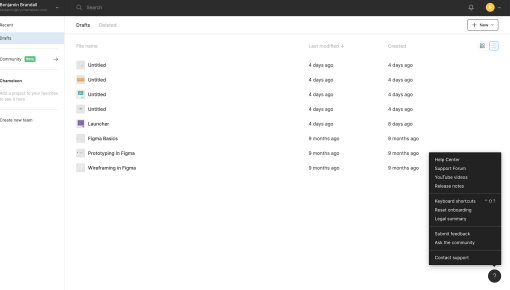
Figma Launcher
In-app launcher to offer help resources, link to feature releases, and solicit feedback



Existing customer? Sign in
Find answers to common questions, learn essential best practices, and get support from the team—all organized in one easy-to-navigate resource center.
Your support team is drowning in tickets. Users can't find answers to basic questions. Sound familiar? You're not alone—most SaaS companies struggle with the same challenge: how to help users help themselves without overwhelming your support resources.
A software help center template provides the structured framework you need to organize user support resources effectively. Unlike traditional static help pages, modern help center templates integrate directly into your product experience, delivering contextual assistance exactly when and where users need it most. This approach doesn't just reduce support burden—it transforms how users discover, learn, and succeed with your software.
The key difference lies in moving beyond external knowledge bases to in-app guidance systems that meet users in their moment of need. With tools like Chameleon's interactive demos, tours, and contextual nudges, you can create help experiences that feel less like documentation and more like having a helpful colleague right beside your users.
A software help center template is a pre-built framework that organizes your user support resources into a structured, searchable, and easily navigable system. Think of it as the blueprint for creating self-service support that actually works.
The core components include search functionality that helps users find specific solutions quickly, categorized resources organized by user journey stage or feature area, and a fundamentals section covering essential getting-started information. But here's where modern templates differ from traditional approaches: they're designed for contextual, in-app delivery rather than static external pages.
Traditional help centers force users to leave your product, search through generic articles, and then return to apply what they've learned. Interactive help center templates eliminate this friction by embedding assistance directly into your product interface. Users can access relevant help without losing their place in their workflow.
The benefits extend beyond convenience. Well-implemented help center templates reduce support ticket volume by 30-40%, improve user autonomy and confidence, and accelerate problem resolution. More importantly, they connect directly to user onboarding and product adoption—helping users not just solve immediate problems but discover new capabilities and use cases.
When users can find answers quickly within your product, they're more likely to explore advanced features, complete key workflows, and ultimately become power users who drive expansion revenue.
Implementing an effective help center template requires strategic thinking about user needs and smart deployment of the right tools. Here's your step-by-step approach:
1. Setup Phase: Map User Pain Points Start by identifying the most common user questions and friction points. Analyze your existing support tickets, user feedback, and product analytics to understand where users consistently get stuck. Don't just focus on technical issues—include questions about feature discovery, workflow optimization, and use case expansion.
2. Content Organization: Structure by User Journey Organize your help resources around user journey stages rather than product features. New users need onboarding support and basic navigation help. Growing users want feature tutorials and workflow optimization tips. Power users seek advanced configurations and integration guidance. This journey-based structure makes help content more discoverable and relevant.
3. Implementation: Deploy with Chameleon's Tools Use Chameleon's Launcher as your help center access point—it's always available but never intrusive, appearing contextually when users need assistance. Interactive Demos become your secret weapon here, showing users exactly how to complete tasks rather than describing steps in text.
Deploy Tours to guide users through your help resources systematically, especially for complex workflows that require multiple steps. This prevents users from getting lost in documentation and ensures they complete important processes successfully.
4. Integration: Connect Help to Product Areas The magic happens when help resources connect directly to specific product areas. Use Chameleon's Tooltips to surface relevant help content based on user behavior—if someone's struggling with a particular feature, proactively offer assistance before they get frustrated enough to submit a ticket.
Leverage Surveys strategically to identify knowledge gaps in real-time. When users encounter problems, quick micro-surveys can help you understand what additional help content would be most valuable.
Contextual Placement: Right Time, Right Place Surface help when users need it most, not when it's convenient for you. This means analyzing user behavior patterns to understand common friction points and deploying assistance proactively. If users typically struggle with a specific workflow step, place help content directly in that interface rather than burying it in a general help section.
Progressive Disclosure: Start Simple, Go Deep Begin with basic solutions and offer pathways to more detailed resources. Not every user needs comprehensive documentation—many just want quick answers to simple questions. Structure your help content in layers, allowing users to dive deeper only when necessary.
Visual Hierarchy: Make Scanning Effortless Use clear headings, bullet points, and visual elements like emojis to make content scannable. Users don't read help content linearly—they scan for relevant information. Design your templates to support this behavior with strong visual hierarchy and logical information architecture.
Search Optimization: Use User Language Include keywords and phrases users actually search for, not internal product terminology. Your "Advanced Reporting Dashboard" might be called "analytics" or "data export" by users. Build your help content vocabulary around user language, not product marketing copy.
Feedback Loops: Measure and Improve Collect data on help effectiveness through user ratings, completion tracking, and follow-up surveys. The best help centers evolve based on actual user behavior and feedback rather than assumptions about what users need.
Chameleon's approach offers significant advantages over traditional help centers. Real-time help delivery means users get assistance without leaving their workflow. Behavioral targeting enables personalized help experiences based on user segments, roles, or usage patterns. Built-in analytics show you exactly which help content drives success and which needs improvement.
Software help center templates excel in several key scenarios. During new user onboarding, contextual help reduces time-to-value by guiding users through essential setup steps and early workflows. For feature discovery and adoption, in-app help surfaces relevant capabilities when users are most likely to find them valuable.
Complex workflow troubleshooting becomes more manageable when users can access step-by-step guidance without leaving the interface where they're experiencing problems. This approach is particularly effective for reducing repetitive support inquiries—the questions that consume disproportionate support resources despite having straightforward solutions.
Perhaps most importantly, well-designed help centers improve user retention through self-service success. When users can solve problems independently, they develop confidence and product mastery that translates into long-term engagement and expansion opportunities.
How do I customize a help center template for my software? Start with your most common support tickets and user feedback. Adapt the template structure to match your product's key workflows and user journey stages. Focus on contextual placement rather than comprehensive coverage initially.
What's the difference between help centers and knowledge bases? Help centers are user-facing support systems designed for self-service problem-solving. Knowledge bases are broader information repositories that may include internal documentation, detailed technical specs, and comprehensive product information beyond immediate user needs.
How can I measure help center effectiveness? Track metrics like support ticket reduction, help content engagement rates, user task completion following help interactions, and user satisfaction scores. The goal is connecting help usage to actual user success outcomes.
Should help resources be in-app or external? In-app help resources consistently outperform external alternatives because they eliminate context switching and provide assistance exactly when users need it. External resources work best for comprehensive documentation that users reference outside their normal workflow.
How do I reduce support tickets with better help centers? Focus on proactive help delivery based on user behavior patterns. Use tools like Chameleon's Tooltips to surface relevant assistance before users get stuck, and ensure your help content addresses the root causes of common support requests rather than just symptoms.
The most effective software help center templates don't just organize information—they transform how users experience support from reactive problem-solving to proactive guidance that drives product success.
Start a free trial or talk to our team.
