









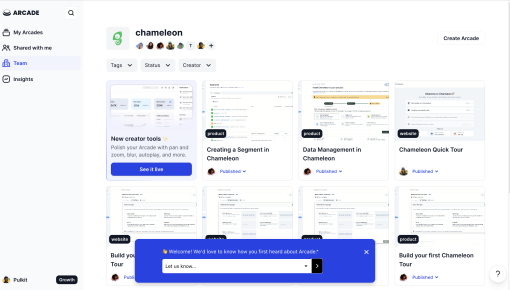
Arcade's Feedback Microsurvey
Arcade’s microsurvey is the introvert’s dream of collecting feedback: quick, unobtrusive, and straight to...



Existing customer? Sign in
Share honest thoughts and suggestions about the product in your own words to help the team understand what can be improved. Give specific feedback that guides future updates and makes the product better for everyone.
Getting meaningful feedback from users shouldn't feel like pulling teeth. Yet most product teams struggle to collect actionable insights that actually drive product decisions. The problem? Generic surveys that ask the wrong questions at the wrong time, leaving you with shallow data that doesn't reveal the "why" behind user behavior.
Qualitative feedback is the secret weapon of successful product teams. While quantitative data tells you what users are doing, open-text responses reveal why they're doing it—uncovering pain points, feature requests, and emotional reactions that numbers alone can't capture. This feedback survey template with open text responses helps product managers, marketers, and growth teams gather the rich, contextual insights needed to build products users actually love.
In this guide, you'll learn how to implement an effective feedback survey template, discover best practices for maximizing response rates, and see how Chameleon's Survey feature makes collecting user feedback seamless and actionable.
A feedback survey template is a pre-designed framework for collecting user opinions, experiences, and suggestions about your product. Unlike rigid multiple-choice surveys, feedback survey templates with open text responses give users the freedom to express their thoughts in their own words, providing richer, more nuanced insights.
The key difference between structured and open-text surveys lies in the depth of information gathered. While structured surveys excel at quantifying user sentiment across large groups, open response fields capture the context, emotions, and specific details that drive meaningful product improvements. When a user writes "The dashboard feels overwhelming because there are too many buttons competing for attention," you get actionable feedback that a 1-5 rating scale simply can't provide.
This template format works particularly well for product teams because it balances efficiency with insight quality. You can deploy it quickly across different user segments while still gathering the qualitative data needed for informed decision-making. Common use cases include post-feature launch feedback, onboarding experience evaluation, and general product satisfaction monitoring.
Chameleon's Survey feature makes implementing this template effortless by embedding feedback collection directly into your product experience. Instead of redirecting users to external survey tools, you can capture insights at the moment of interaction—when user emotions and memories are most vivid and accurate.
Timing is everything when it comes to feedback surveys. The most effective approach is triggering surveys immediately after key user interactions—right after completing an onboarding flow, using a new feature, or reaching a milestone in your product. This contextual timing ensures users can provide specific, relevant feedback while the experience is fresh in their minds.
Place your feedback survey strategically within the user journey. High-impact moments include post-task completion screens, feature announcement modals, or as exit-intent surveys when users are about to leave a specific page. The goal is capturing feedback when users have enough context to provide meaningful responses but aren't interrupted during critical workflows.
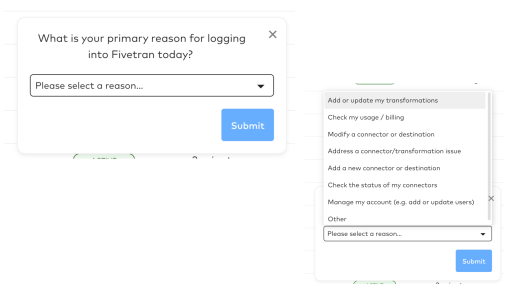
Customize your survey's heading and subheading to match the specific context. Instead of generic "How was your experience?" try "How did setting up your first automation feel?" or "What's your biggest challenge with our reporting dashboard?" Specific questions yield specific, actionable answers.
Chameleon's Survey builder transforms feedback collection from a technical headache into a strategic advantage. The no-code interface lets product teams create and deploy surveys in minutes, not weeks. You can design surveys that match your product's visual identity, ensuring a seamless user experience that feels native rather than intrusive.
The real power lies in Chameleon's targeting and segmentation capabilities. You can show different survey versions to different user segments—asking power users about advanced features while focusing on core functionality for newer users. This targeted approach increases response rates and ensures you're gathering relevant feedback from each user group.
Integration with existing workflows means survey responses automatically flow into your product management tools, customer support systems, or analytics platforms. No manual data export or CSV wrangling required—just clean, organized feedback ready for analysis and action.
Adapt this template for different scenarios by adjusting the question focus and survey length. For feature-specific feedback, narrow your questions to that particular functionality. For broader product insights, ask about overall experience and improvement priorities. The template's flexibility allows you to maintain consistency while addressing specific research needs.
Personalize messaging using dynamic fields that reference the user's name, recent actions, or account details. "Hi Sarah, you just created your third workflow—what's working well so far?" feels more engaging than generic survey copy and typically generates higher response rates.
Set up follow-up actions based on survey responses. Positive feedback can trigger upgrade prompts or referral requests, while negative feedback can automatically create support tickets or schedule follow-up conversations. This responsive approach shows users their feedback matters and creates opportunities for deeper engagement.
Deploy surveys at optimal moments when users are most likely to respond thoughtfully. Research shows the highest response rates occur immediately after successful task completion or positive product interactions. Avoid surveying users during error states or high-stress moments when they're focused on problem-solving rather than reflection.
Write survey copy that encourages honest, detailed responses. Use conversational language and explain how feedback will be used: "We're working on improving our dashboard—your insights help us prioritize which changes to make first." This transparency builds trust and motivates users to invest time in thoughtful responses.
Balance survey frequency to avoid fatigue while maintaining consistent feedback flow. A good rule of thumb is limiting individual users to one survey per month, but you can increase frequency for highly engaged users who consistently provide valuable feedback. Track response rates and adjust timing if you notice declining participation.
Create psychological safety for honest feedback by emphasizing that all responses are valuable, including criticism. Phrases like "We want to hear about both positive experiences and areas for improvement" signal that you're genuinely interested in learning, not just collecting praise.
Follow up on feedback received to close the loop with users. When possible, let respondents know how their input influenced product decisions. This follow-up builds loyalty and increases the likelihood of future survey participation.
Chameleon's advanced targeting ensures surveys reach the right users at the right moments. The platform's analytics integrations provide immediate visibility into response patterns and sentiment trends.
Post-feature launch feedback collection helps product teams understand how new functionality performs in real-world usage. Deploy surveys 3-7 days after users first interact with new features to capture both initial impressions and usage patterns.
Onboarding experience improvement surveys identify friction points in your user activation flow. Target users who've completed onboarding within the past week to gather fresh insights about setup challenges and success factors.
Product-market fit validation uses open-text feedback to understand how well your product solves real user problems. Ask users to describe their biggest challenges and how your product addresses them—responses reveal positioning opportunities and feature gaps.
Customer satisfaction monitoring provides ongoing pulse checks on user sentiment. Regular feedback collection helps identify emerging issues before they impact retention and reveals opportunities for proactive customer success outreach.
Feature request gathering transforms user suggestions into product roadmap insights. Open-text responses often reveal not just what users want, but why they want it—context that's crucial for prioritization and design decisions.
How do you set up a feedback survey in your product? With Chameleon, creating in-product surveys takes just minutes using the visual builder. Choose your trigger conditions, customize the survey design, set targeting rules, and publish. The survey automatically appears to qualified users based on your criteria.
What's the best time to ask users for feedback? The optimal timing is immediately after meaningful user interactions—completing tasks, reaching milestones, or using new features. This contextual approach captures accurate, detailed feedback while experiences are fresh.
How can you increase survey response rates? Focus on relevance, timing, and value exchange. Ask specific questions about recent user actions, explain how feedback will be used, and keep surveys short.
What should you do with open-text feedback responses? Analyze responses for common themes, specific feature requests, and emotional indicators. Create action items for product improvements, share insights with relevant teams, and follow up with respondents when their feedback influences decisions.
How often should you send feedback surveys? Limit individual users to one survey per month to avoid fatigue, but you can survey different user segments more frequently. Monitor response rates and adjust frequency based on engagement patterns.
Can you customize the survey template for different user segments? Yes, Chameleon's segmentation features let you show different survey versions to different user groups. Tailor questions, messaging, and timing to each segment's specific context and needs.
Ready to start collecting actionable user feedback? Chameleon's Survey feature makes it easy to implement this template and start gathering insights that drive product decisions. The combination of contextual timing, seamless user experience, and powerful analytics turns feedback collection from a necessary chore into a strategic advantage.
Try this template in Chameleon and see how easy it is to gather the qualitative insights your product team needs to build better user experiences.
Start a free trial or talk to our team.
