Product teams aren't short on questions. What did users actually think of that change? Who's watching our Demos, and are they the right people? Why did this pop up here? The answers exist, but getting to them means extra steps.
February's releases cut those steps out. Ask Copilot what your users need, and it tells you, with full context of your account, not a generic summary. Check your Demo audience and see exactly who watched and whether they made it through. Set a URL exclusion rule once, and Chameleon enforces it everywhere, automatically.
Less distance between your question and your next move.
One ask: Copilot analyzes Microsurvey responses
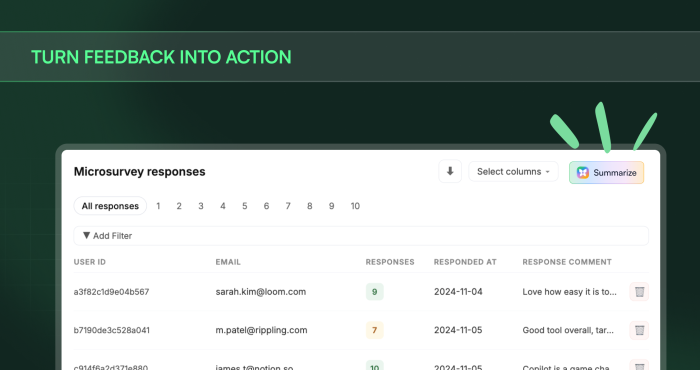
You run a Microsurvey. Responses come in. Then what?
Most teams end up in one of two places: someone cobbles together a generic summary that misses the nuance, or the data waits, sitting in a tab while everyone's too busy to act on it properly.
The problem isn't the data. It's that synthesizing open-ended responses into something actionable takes real effort — and generic AI tools lack the context to do it well. They don't know your users, your experiences, or what you were actually trying to learn.
Copilot does. It lives in your Chameleon account, knows your setup, and can read your Microsurvey responses in seconds. Ask it to surface the most common frustrations. Ask how to follow up with a specific audience. Same chat, no export, no prompt engineering to explain what your product even does.
👇 Explore a Demo of Copilot analyzing feedback
One look: Know who's watching your Demos
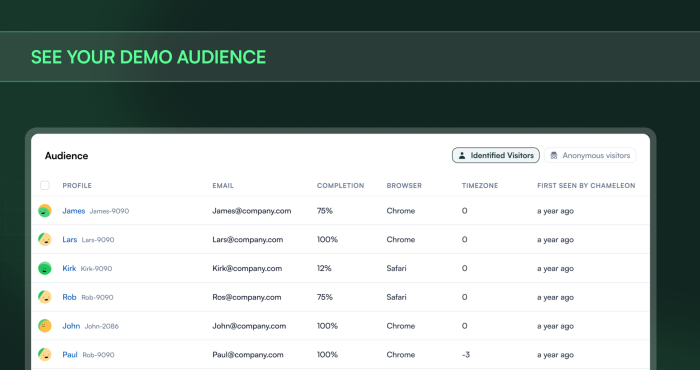
Interactive Demos are easy to share. Knowing what happens after you hit publish is harder.
You drop a link in a follow-up email, post it in a blog, embed it on a landing page. Views come in. But "views" is a pretty blunt instrument when what you actually want to know is: did the right person watch this? Did they make it through?
The Demo Audience answers those questions. It shows you identified viewers, real people Chameleon can tie to your product, alongside anonymous viewers, each with their completion status. So instead of a raw view count, you get a picture of who engaged and how far they got.
And "how far they got" matters. Step insights show you where viewers drop off across your demo, so when the same step keeps losing people, you know exactly where to focus.
You stop guessing whether the right people saw it. You know.
👇 Explore a Demo of Demo analytics
One rule: Experiences stop where they should
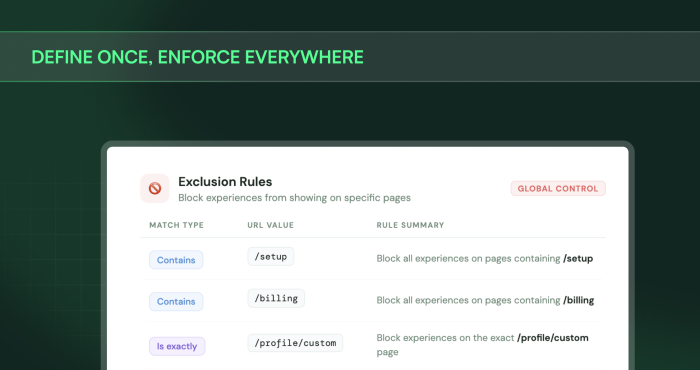
This one’s big for scaled control. And the kind of thing that, once it's set, you stop thinking about entirely, which is the whole point.
URL Exclusion Rules let you define pages across your account where no experience should ever appear. Think checkout flows or active error states — the pages where an in-app nudge isn't helpful guidance, it's just noise in the wrong moment.
Previously, keeping experiences off these pages meant configuring exclusions at the individual experience level. Every new Tour, every new Microsurvey — you'd have to remember to add the rule again. And if someone on your team forgot, users would see something they shouldn't.
With account-level URL Exclusion Rules, you define it once. Chameleon handles the rest, automatically, across every experience, for every user. No exceptions to remember, no configuration to repeat.
It runs in the background, enforces your intent, frees you up to build without second-guessing every time.
👇 Explore a Demo of URL Exclusion Rules
Coming soon: User Retention chart
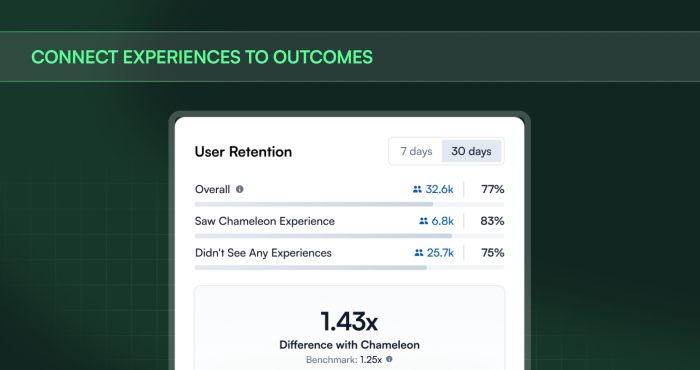
Soon you'll get a Retention chart in your dashboard that shows the impact of your Chameleon experiences on user retention. Users who saw an experience vs. those who didn't, side by side. A clear picture of a metric that matters more to your bottom line than clicks.
Three features. Three fewer things standing between your question and your next move. Ask, look, set. Then get back to building.
Book a demo to discover AI-first user onboarding
So you can get back to orchestrating product adoption